Friday, April 3, 2026
What Does a Good Marketing Back-End for a Plugin Developer Look Like?

James Russell
Music Software Marketing Consultant
James is a business and marketing consultant for music software companies. He's always on the lookout for new startups with the next big thing.
https://www.eggaudio.com/
I usually write these articles about the front-end of marketing. Sensational and sexy topics like how to price an audio plugin, how a small developer can grow in size, and why we do intro sales, anyway? But this time, I’m taking you on a tour under the manhole cover, into the marketing sewers. Please wear some appropriate footwear.
You see, behind every high-performing email is a well thought-out mailing list integration; behind every tailored ad is the correct data, well captured; and behind every sale, there’s any number of good decisions that helped to nurture it. When marketing systems are made properly, they make marketing work better.
So in this article, I’ll describe the perfect basic marketing system from the back end: what you should measure; what’s connected to what, how it should all be set up for best results. Of course, every situation has its uniqueness, but I’ll lay out the systems that should and could be in place for a generic situation.
A Good Marketing Back-End for a Plugin Developer Looks a Bit Like This
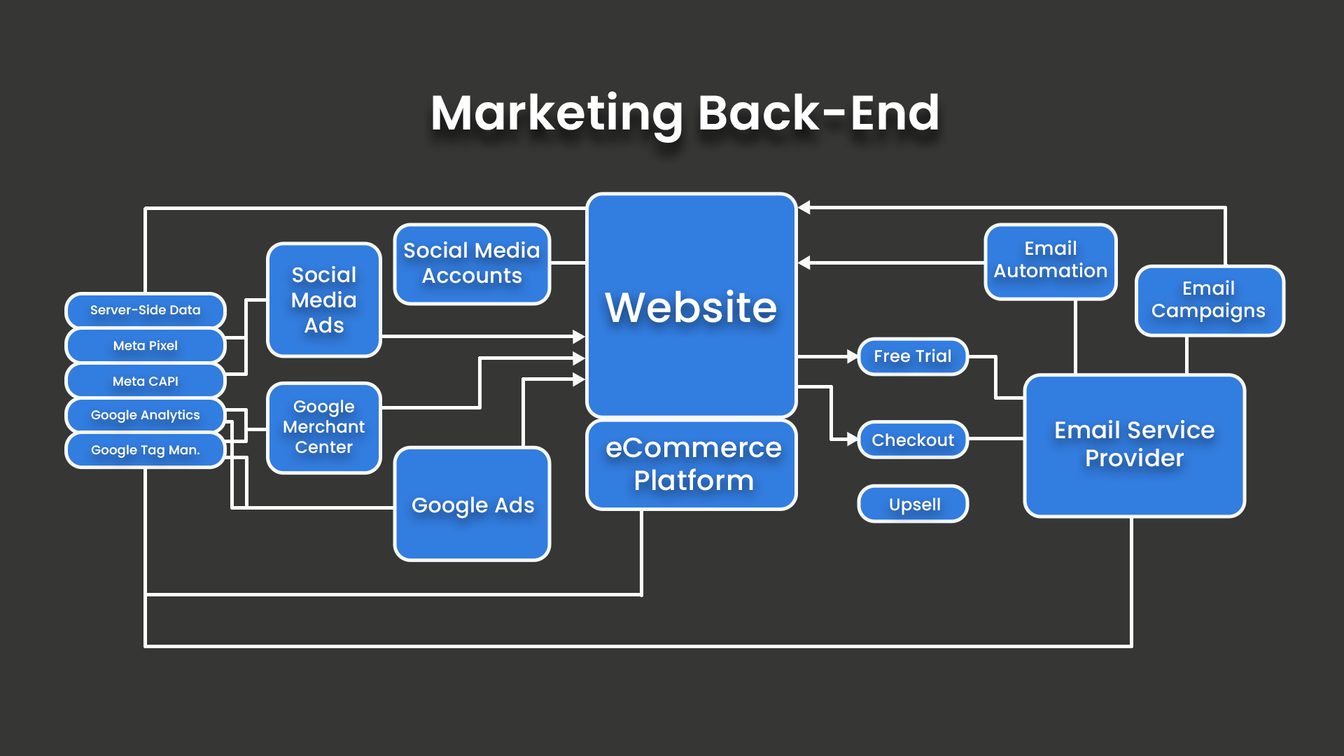
Here’s a visualization of the most necessary marketing infrastructure, in my opinion. When I start working with a new developer, this is an approximation of the system I aim to set up, although not every system makes this necessary – it depends on the plugin, the target customer, and the developer itself.
This is where Moonbase can come in
As an eCommerce system specialized in plugins and music production, Moonbase can cut out a lot of the frustration of connecting the dots behind the scenes. Because we can also take care of licensing, as well as checkout and integration with your marketing platforms, we can simplify your back-of-house marketing operations.
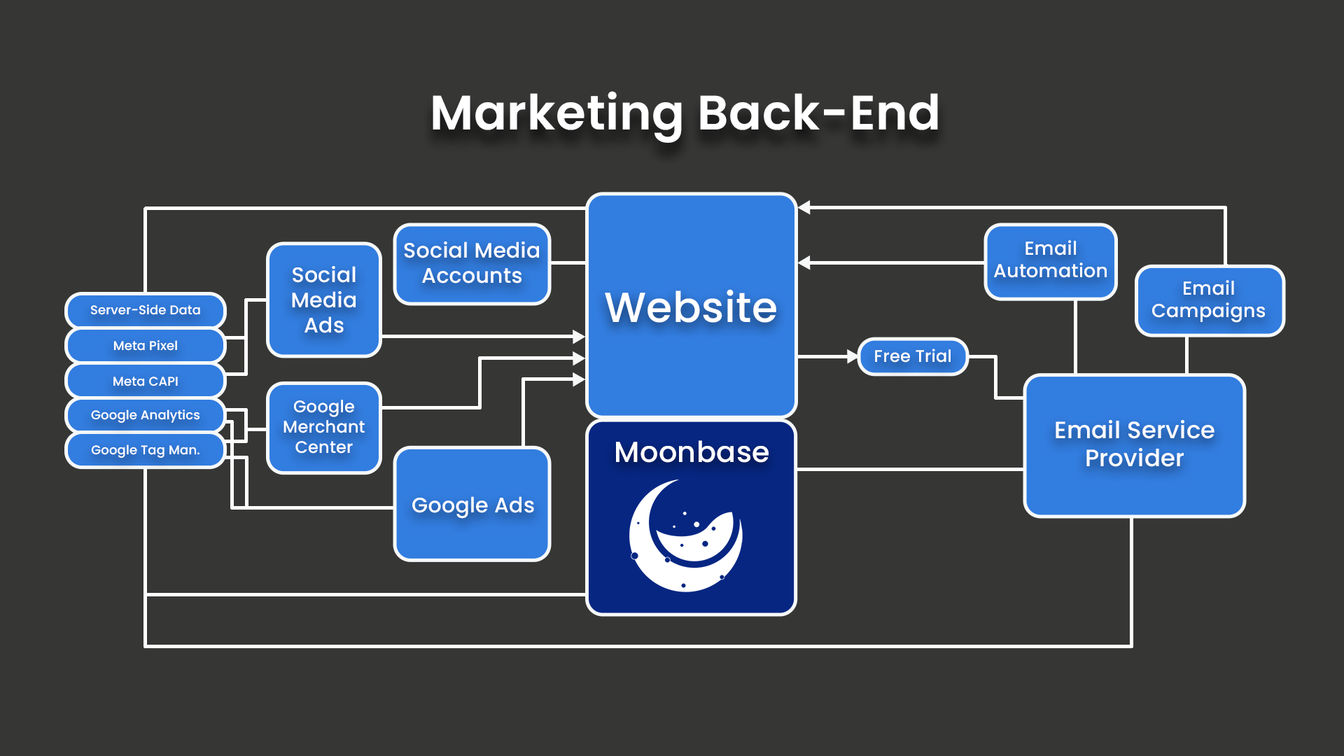
In a setup like this, Moonbase does the heavy lifting of syncing customer data with your Email Service Provider, providing up-sell tooling, and much more.
The Nuts and Bolts of the Marketing Back-End Explained in Context
Email Service Provider
Email is a huge part of the game when it comes to marketing plugins. Free trials and free software are generally used as an email gate, and then emails are sent out with a usually-quite-impressive success rate. The benefits of having your email provider well integrated into your marketing system are covered in the next couple of sections.
How to Connect your Email Service Provider: The obvious place is Your Website, where you should have sign-up forms on homepage and product pages. You should also pass across emails when people download a free trial or free piece of software. Data should be passed when any product is sold, so connect your ESP with your eCommerce Platform. And ideally, data should also be passed when someone activates a plugin or free trial, so you may need to connect your ESP with your Licensing Platform.
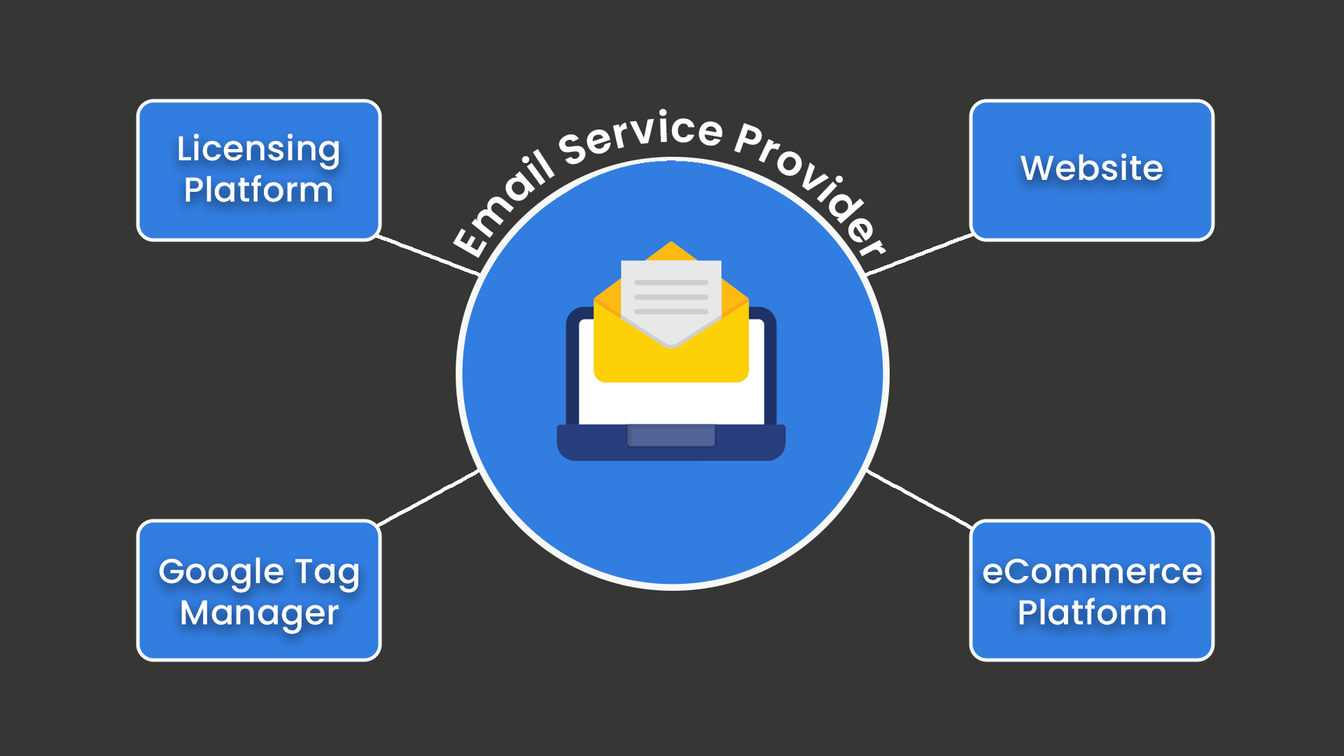
Emails should be tagged, listed or categorized automatically. Your Email Service Provider should know when a user has downloaded something, activated something and bought something.
Moonbase does all of this automatically, using our marketing integrations which creates tags or lists in your newsletter platform of choice to support segmentation.
Email Automation
You can use your ESP to set up rules-based email sends. The effectiveness of this depends on how well-connected your ESP is to the rest of your system. One example of email automation is this: Once a user downloads a 14-day free trial of a plugin, they can be sent an email if they haven’t activated it after three days; perhaps an email after a week of using it, giving some tips and tricks; an email close to the end of their trial period; and even emails after the trial period is over.
Free Trial
Other than satisfying user demand, a good reason to implement a free trial of a plugin is the ability to gain an email address of an interested person, and to trigger automated emails (see below). For this reason, your Free Trial system (downloads, activations, even usage in some cases) should be well connected.
How to Connect your Free Trial: Connect it to your Email Service Provider using a tagging system or other data. Connect it to your eCommerce system to understand the difference between trial users, instabuyers and trial conversions. Use the download of your free trial as a Google Analytics Event signal, for better analytics of behaviour, and better ad optimization.
Checkout / Upsell
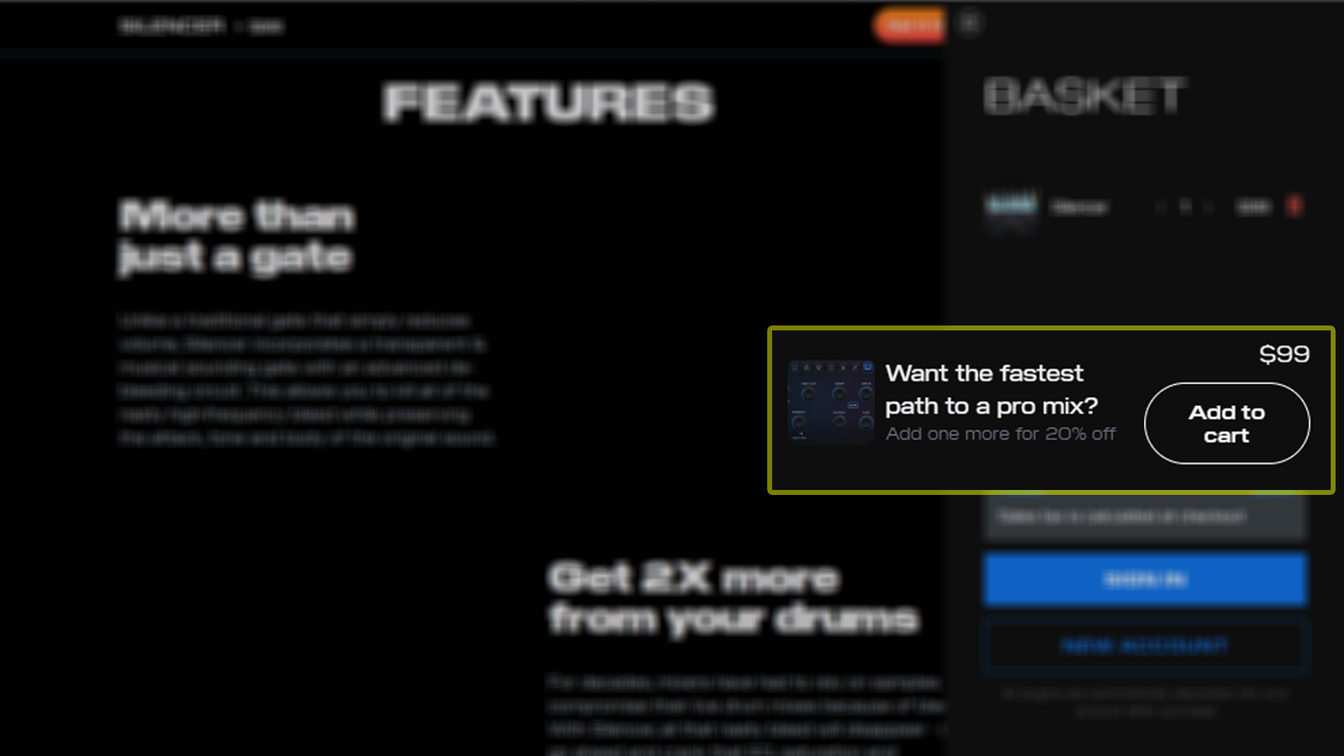
Your checkout might not have been something you’ve thought about much, but there are some features that can push it to the next level. Being able to see what a (logged in) user has bought previously, as well as what they’re buying now, can help you to give them particular offers. The most effective, simple-to-use free trial system I’ve ever worked with counted free trials as a checkout product at $0.
Working out things like bundle upgrades and ‘missing plugins’ prices can get frustrating for technical and accounting purposes, so having a decent checkout worked out before your plugin company grows will save a lot of headaches.
Meta PIxel and Meta CAPI
If you want to advertise using Meta ads – which can be genuinely useful for discovery, unlike other ad platforms – then having the Meta Pixel(s) installed on your website is going to more this far more effective. By reporting back to Meta when certain visits lead to sales or other key events, the pixel helps optimize your ads and their reinforcement learning.
Meta’s CAPI (Conversions API) acts similarly, but uses server-side signals to report back, rather than relying on the user’s machine and connection – which is increasingly worthless.
How to Connect Meta Pixel and Meta CAPI: Both should be created with Meta and then integrated into Your Website as simple header code.
Google Analytics
I used to use Google Analytics for analytics, but I use it a lot less nowadays. Tracking was never reliable and seems to have become worse, and I’ve made enough insights from user behaviour to be satisfied for the moment. What Google Analytics is really good for in my systems is to build audiences for remarketing via Google Ads.
How to connect Google Analytics: Connect it to Google Ads to import Audiences (set up in Settings). Feed it with data from your website by integrating your Google Tag across Your Website. You’ll also want to connect GA up to your eCommerce Platform. so it can give you more context on what’s generating revenue.
If you haven’t messed around with Analytics before and want to understand some user behaviour on your website, using Events such as “played a video” and “scrolled to section” can give you some insights, and they might not be what you expected.
Google Merchant Center
It’s not really built for plugins, and GMC will try to demand product SKU numbers and not understand that there’s no inherent shipping cost for a downloadable product… but it’s possible to put your plugins into it. I don’t think many really browse Google’s ‘Shopping’ tab for plugins, so the real advantage of GMC is for the Shopping Ads you get from time to time when you search for something like VST Compressor Plugin or Wurlitzer VST.
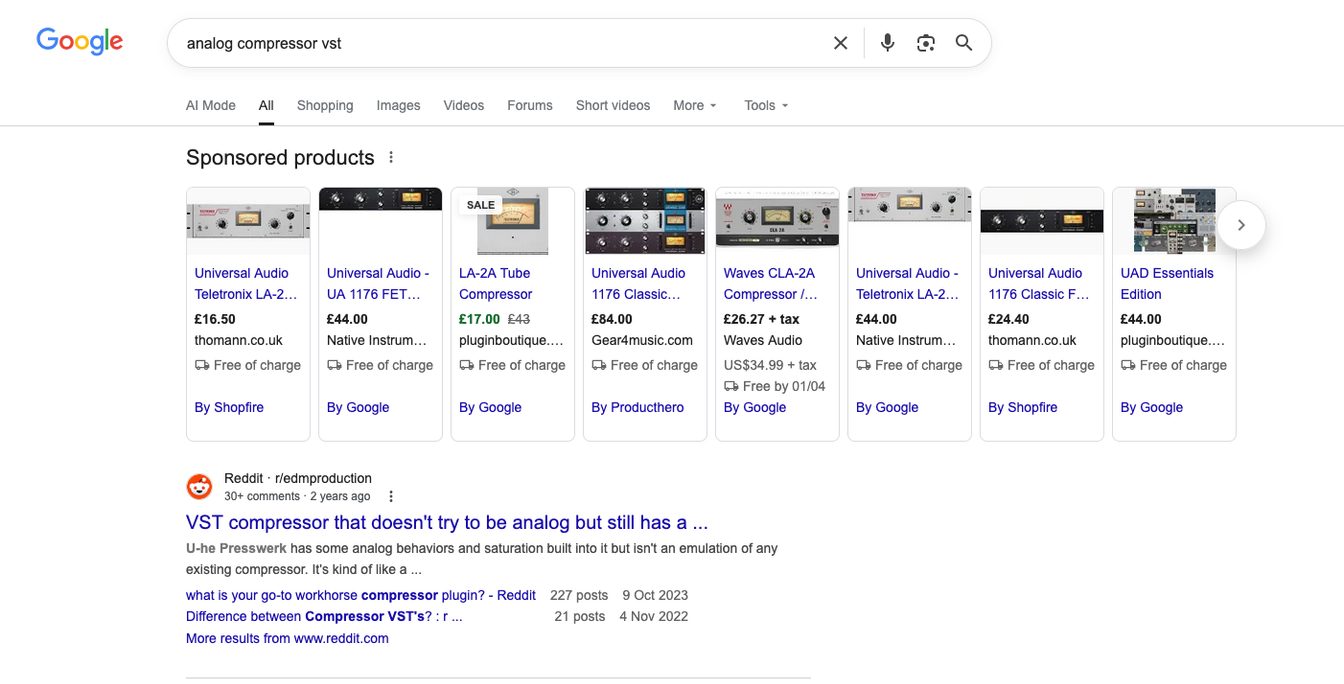
Shopping Ads can be effective for product discovery, but only under certain circumstances. The worthiness of GMC depends on the search frequency for the product category, the plugin itself, and what your competitors are doing in this space. GMC integration can also help feedback with Google Ads conversions when certain products are bought.
How to connect Google Merchant Center: Make sure it’s integrated with the products as shown on Your Website, and ensure they’re up to date if you make major changes or launch new versions. You’ll likely want to make sure it’s integrated with Google Ads too, and receiving information from Google Tag Manager.
Your Own Server-Side Data
Given the accuracy of tracking from your own server, there are a lot of things that make sense by setting up a few beacons of your own.
You could count the number of times a plugin’s manual is downloaded, how many times a free trial or free piece of software is downloaded, or simply how users interact with your website. This isn’t something to do to supplement your other sources of data, but rather to add extra sources, helping bring the picture into focus from a different angle.
Generally, no one source of data will be able to give you the whole picture of your marketing operations. Thanks to privacy settings, different laws in different regions, and different browsers, no tracking you attempt will ever be 100% accurate. Given this, increasing the number of sources gives you more chance to understand what’s really going on.
Upgrade your business
Ready to get started?
Set up your storefront, licensing, and payments in one place. No duct tape required.