A storefront and checkout on your own website

Cart, checkout, customer accounts, downloads and license activation, added to the website you already have with one script tag. Moonbase takes the payment, charges the right tax and delivers the downloads.

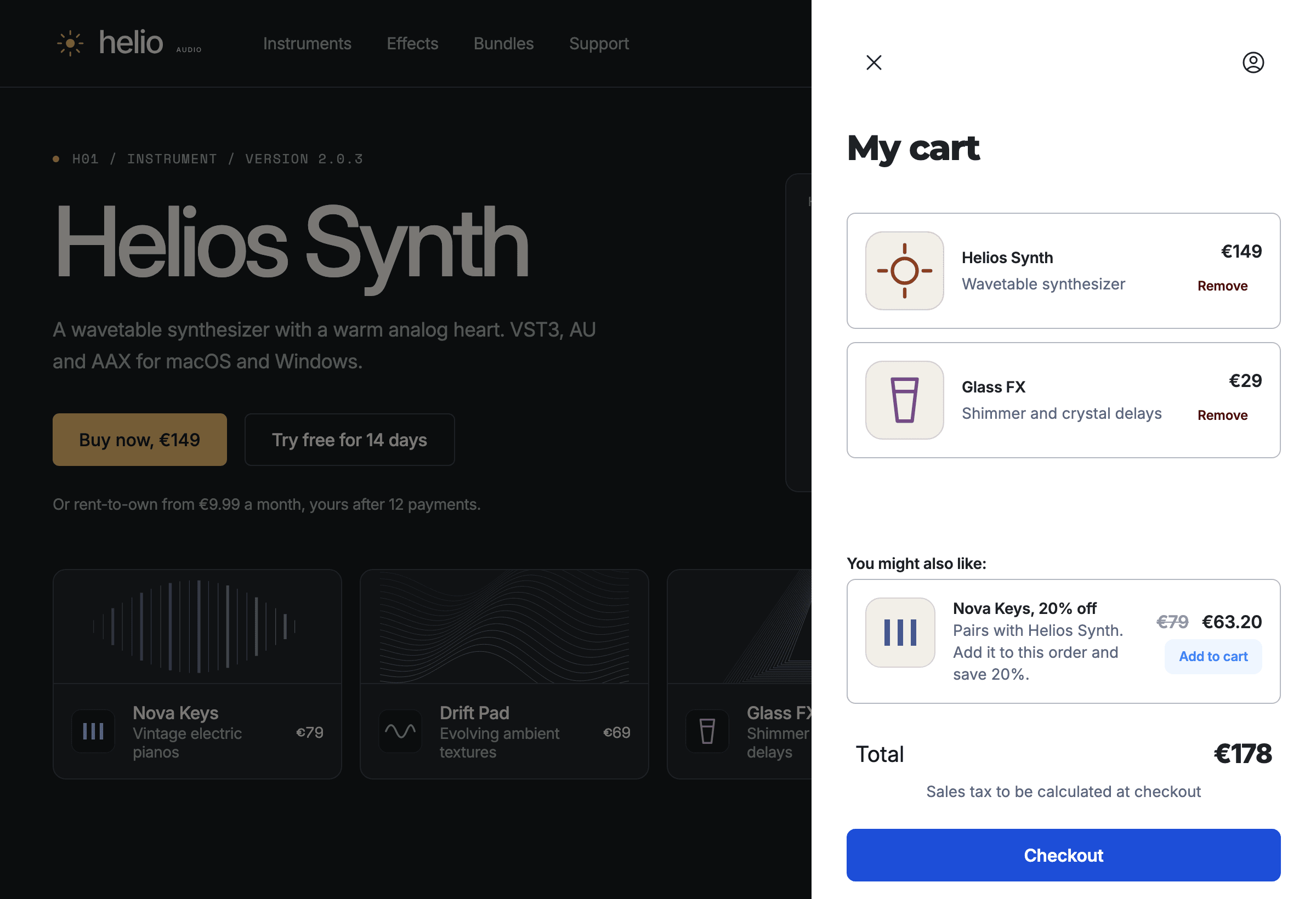
Helio Audio's website with the cart open on top of it: Helios Synth and Glass FX, a Nova Keys offer at 20% off, and the checkout button
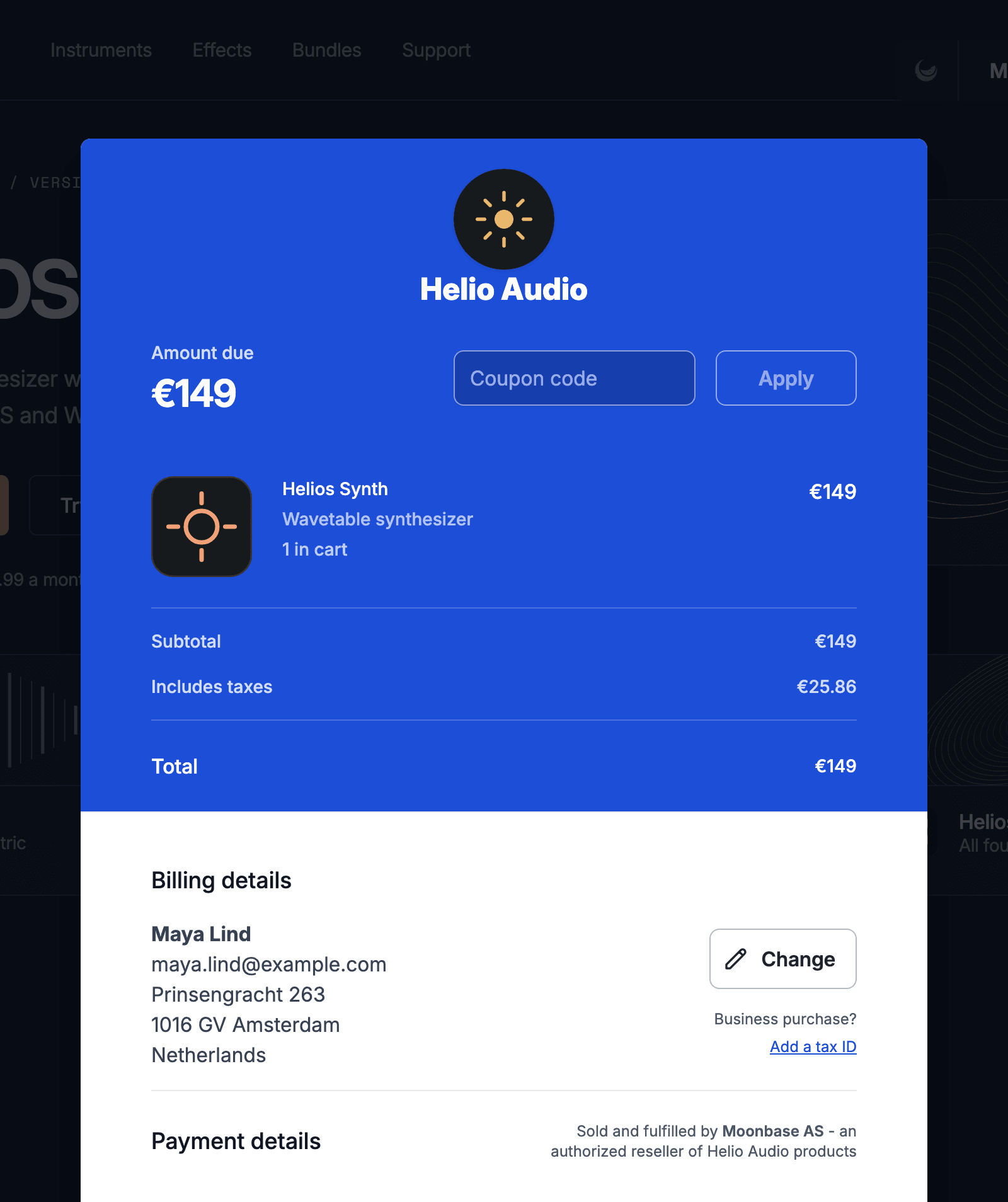
The checkout for Helios Synth at €149, with the taxes included shown above the total

Embedded storefront

What the storefront adds to your site

Shopping cart.
A cart customers manage themselves, opened from Add to cart buttons that are part of your own pages. Bundles, quantities and cart offers included.
Overlay checkout.
Checkout opens over your page on desktops and tablets, so buyers never leave your site. On phones it switches to a full page, where Apple Pay and Google Pay show up.
Customer sign-in.
Signed-in customers get the prices meant for them, such as owner discounts, and reach the products and licenses they own.
Themed to your brand.
Set colours, fonts, corners, buttons and cards in a few options, and it reads as part of your website.
Promotions in place.
A sale you start in Moonbase updates every price on your site and can announce itself as a banner or popup, without a deploy.
The cart drawer on helio.audio with Helios Synth and Glass FX, a Nova Keys offer at 63.20 EUR instead of 79, and the total
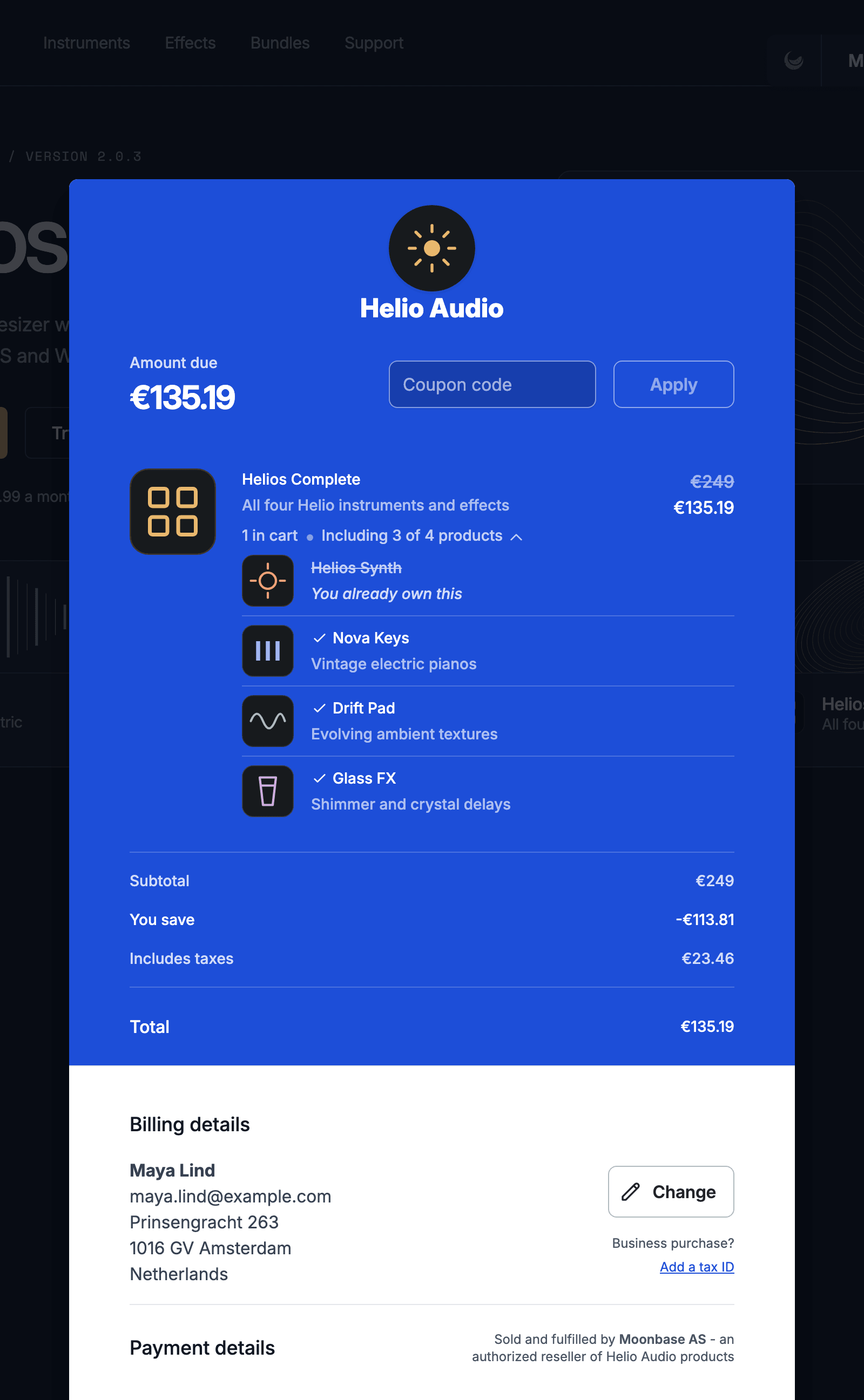
The overlay checkout over helio.audio for the Helios Complete bundle at 135.19 EUR instead of 249, leaving out Helios Synth, which the buyer already owns

Embedded or hosted

Embedded on your site, or hosted by Moonbase

Embed the storefront on any website, whatever it is built with, or send buyers to your own hosted checkout and customer portal. Either way the design stays yours and Moonbase runs everything behind it.

Embedded storefront

A client-side widget that puts cart, checkout and the customer account on your own pages. No API key on your site.

<script src="https://assets.moonbase.sh/storefront/moonbase.js"></script>
<script>
  Moonbase.setup('https://helio.moonbase.sh')
</script>
  • Overlay checkout on desktop, full page on phones
  • Buttons and links open the cart, sign-in, downloads and activation
  • Cart and purchase events forwarded to GA4, Google Tag Manager, Meta Pixel, Klaviyo and TikTok
  • Themed with your colours, fonts, corners and buttons

Static sites, WordPress, Squarespace, React, Vue

Hosted checkout and portal

Send buyers to your account's own checkout and customer portal, with a buy-now link for every product and bundle.

https://helio.moonbase.sh/buy/helios-synth
https://helio.moonbase.sh/buy/bundle/helios-complete
https://helio.moonbase.sh/redeem?code=HELIOS-7K2Q
  • Buy-now links that skip the cart, with coupon and UTM parameters
  • A customer portal for downloads, devices and subscriptions
  • A public page for redeeming vouchers
  • Your own subdomain, such as store.helio.audio

Building a fully custom storefront? Use the storefront API, or the React and Vue SDKs. Setup, buttons and theming for the embedded storefront are in the storefront docs.

Payments

Local payment methods and currencies

Offer the payment methods that fit each buyer. Moonbase takes the payment, works out the tax and delivers the purchase.

  • Cards and local methods for the buyer’s country
  • Apple Pay and Google Pay in full-page checkout
  • About 110 currencies, with automatic conversion

Customer accounts

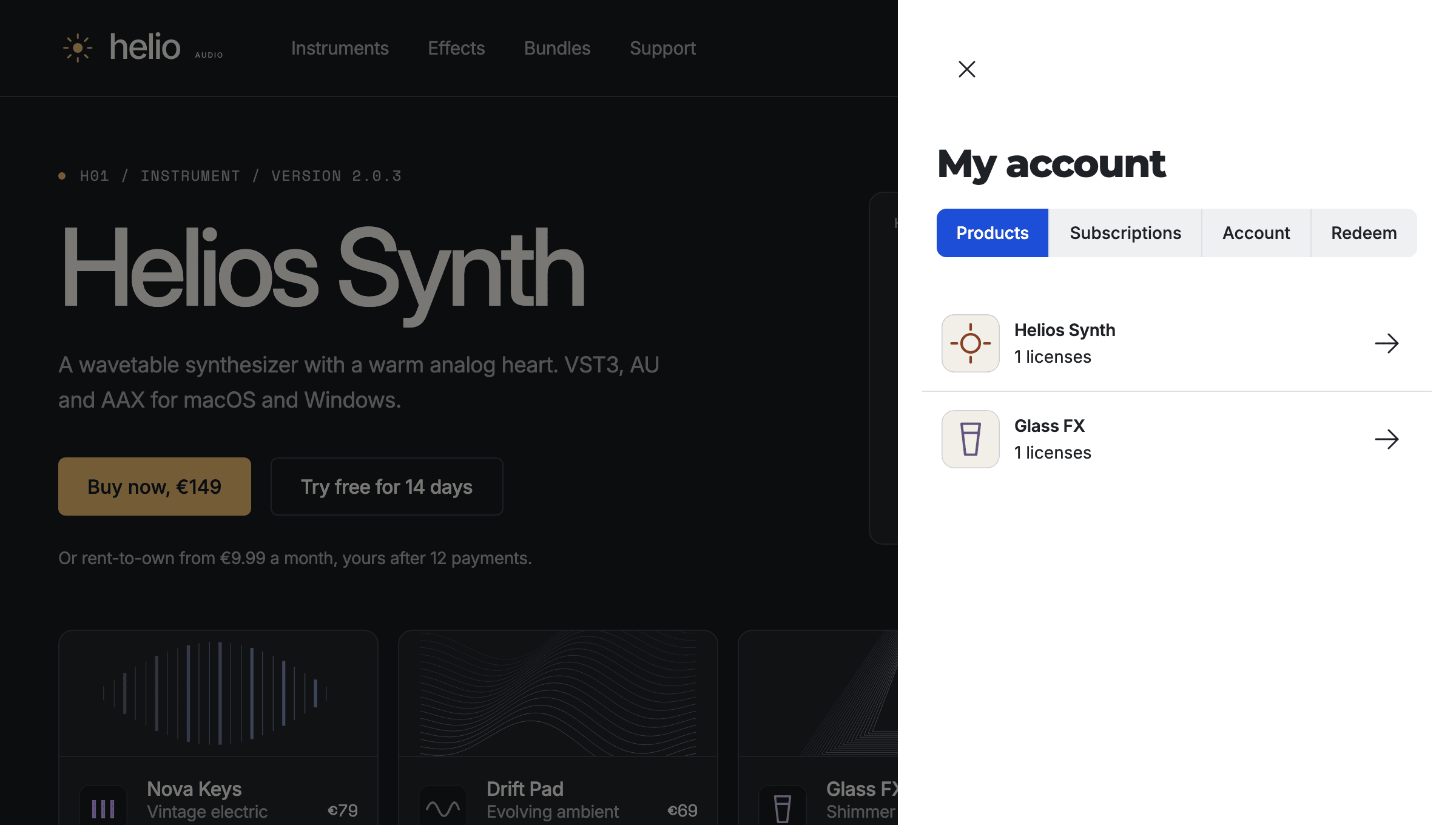
Customers sign in on your website to see what they own, download it, activate it and look after their subscriptions. The storefront draws every screen; your site only needs the buttons.

Maya's account opened on helio.audio by the embedded storefront, listing Helios Synth and Glass FX, with tabs for subscriptions, account details and redeeming a code

A customer's account on helio.audio, drawn by the embedded storefront.

Sign in and sign up

Customer accounts on your own site, so discounts, owned products and licenses follow the customer.

Products and downloads

Everything a customer owns, with the installer for their system recommended the moment they have paid.

License activation

Activate from your app in the browser, or upload a device file from an offline machine. More on licensing

Device management

See where each license is activated and revoke a device to free a seat, without emailing you.

Subscriptions

Update the card, change plan, cancel, or restart a renewal that stopped. More on subscriptions

Vouchers

Redeem a code for products. Guests see what it gives before they sign in.

Release history

Release notes, and downloads of every version the customer is allowed to get.

Newsletter and preferences

Sign-up forms on your own pages, and the emails each customer chooses to receive.

“Moonbase has been a game changer for Black Salt Audio. Their seamless integration allowed us to build a fully branded storefront and provide a frictionless, self-service licensing experience for our customers.”

Shawn Barnes

Black Salt Audio · Read the story

Frequently asked questions

Adding the script and the buttons is a small job for whoever looks after your website, and WordPress sites can use the Moonbase plugin. If you would rather not touch your site at all, use the hosted checkout and buy-now links instead.

Checkout offers what the payment provider supports for the buyer's currency, country and amount: cards, wallets such as Apple Pay and Google Pay, and local methods such as PayPal, Klarna, iDEAL and Bancontact where available. Apple Pay and Google Pay appear in the full-page checkout, which the embedded storefront uses on phones. Subscriptions only offer methods that can be saved for renewals.

Yes. Turn on any of about 110 currencies. Checkout uses the currency of the buyer's country when you have it on, and your default currency otherwise. Prices you do not set by hand are converted and rounded to the style you choose.

Yes. The storefront API and the React and Vue SDKs give you the catalogue, carts, customer sign-in and what each customer owns, so you can build any design you like. Moonbase still takes the payment, handles the tax and delivers the licenses.

Moonbase is the merchant of record, so checkout shows the order as sold and fulfilled by Moonbase AS (Moonbase LLC for some US purchases), an authorized reseller of your products. Moonbase calculates, collects and remits the tax for you.

No monthly fee

Try it on your own website

Add the script, allow your domain and run a test purchase on your own website before you take real payments.