JUCE Module
moonbase_licensing is a drop-in JUCE module that adds Moonbase license activation, and a built-in activation UI, to any JUCE 8 app or plugin. Add the module, fill in three fields, show one component.
It ships inside the open-source Moonbase-sh/moonbase-cpp repository (MIT licensed) at modules/moonbase_licensing/, and talks to the Moonbase licensing API natively. It is not a juce::OnlineUnlockStatus wrapper.
Already shipping with our proprietary moonbase_JUCEClient module? It stays supported, and nothing you have released changes.
This page covers the newer moonbase_licensing module, which is what we recommend for new projects.
The proprietary module is also still available if you would rather use it, with source access granted under your Moonbase service agreement.
Either way, reach out through the support channel or at developers@moonbase.sh.
The module supports:
- Browser-based activations and offline machine-file activations
- Time-based and endless trials, with a days-remaining screen and an included-features list
- Automatic license re-validation with a configurable grace period
- Server-side deactivation, so users can free up an activation seat
- Cross-SDK device identity, so a license activated in a web or Electron app validates in your plugin
- In-app update notifications with release notes and an installer download
- A themeable UI covering every activation state, plus a headless controller if you would rather build your own
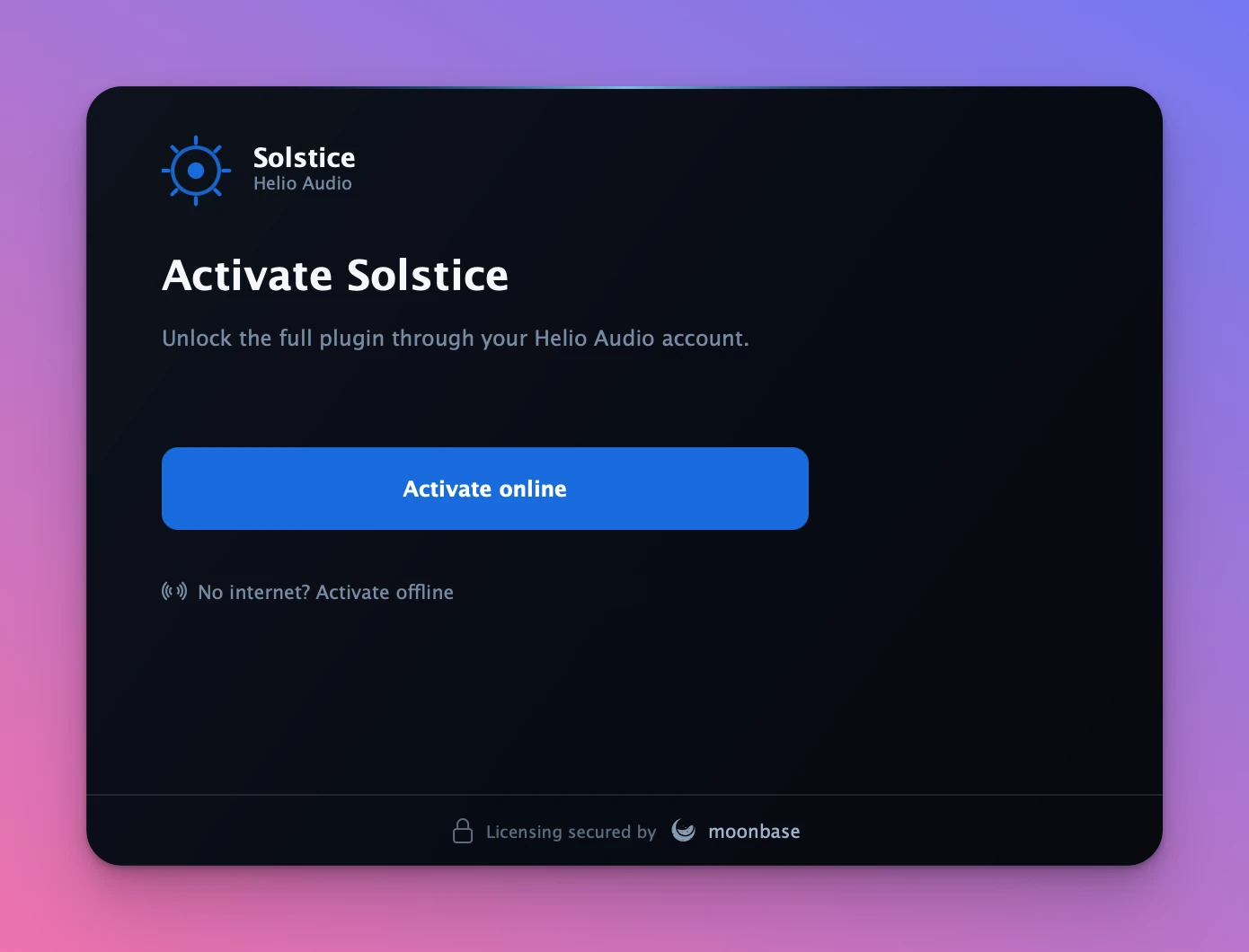
Here is the first thing a customer sees when they open an unlicensed build, with your own product name, logo and accent colour:
Requirements
- JUCE 8.0.4 or newer
- A C++17 compiler
- macOS, Windows, Linux, iOS or Android
The module has no third-party dependencies. Everything it needs comes from either JUCE or the operating system:
| Concern | How |
|---|---|
| HTTP | juce::WebInputStream, so no CURL |
| JSON | a bundled nlohmann/json single header |
| RS256 token verification | OS-native: Security.framework (macOS, iOS), CNG/bcrypt (Windows), system libcrypto (Linux) |
There is nothing to brew, vcpkg or apt install. The one platform caveat is that on Linux the module links the always-present system libcrypto.
Installation
Pull moonbase-cpp into your project, as a git submodule or through FetchContent, and point your build at the module folder. On Apple platforms the module compiles an Objective-C++ translation unit for its Security.framework crypto backend, so your CMake project needs the Objective-C languages enabled.
if(APPLE)
    enable_language(OBJC OBJCXX)
endif()

juce_add_module(external/moonbase-cpp/modules/moonbase_licensing)

target_link_libraries(MyPlugin PRIVATE moonbase_licensing)
target_compile_definitions(MyPlugin PRIVATE JUCE_USE_CURL=0)
Two details are worth knowing about the FetchContent variant. SOURCE_SUBDIR modules points at a directory that has no CMakeLists.txt, so the repository is populated but the C++ SDK's root CMake is never added: that root exposes an interface target pulling in OpenSSL and CURL, and the module needs neither. JUCE_USE_CURL=0 keeps JUCE on its own HTTP stack, which is the transport the module uses.
For Projucer projects, use Modules → Add a module → Add a module from a specified folder… and select modules/moonbase_licensing. The bundled SDK headers and nlohmann/json resolve from the module's own search paths, so there is nothing else to configure.
Configuration
The module is configured in code through ActivationConfig. Only three fields are required, and you will find all of them in the Implementation guide for your product in the Moonbase app.
#include <moonbase_licensing/moonbase_licensing.h>
using namespace moonbase::juce_integration;

ActivationConfig config;
config.endpoint  = "https://your-account.moonbase.sh";
config.productId = "your-product";
config.publicKey = embeddedPublicKeyPem;   // your product's RSA public key
In a plugin build, productName, manufacturerName and applicationVersion fill themselves in from the JucePlugin_Name, JucePlugin_Manufacturer and JucePlugin_VersionString macros. Set them yourself in a plain app.
Misconfiguration does not throw out of construction. A missing or malformed endpoint, productId or publicKey puts the component into its error state and reports the underlying reason through the diagnostics sink described below.
Showing the UI
Add ActivationComponent as a modal over your editor, which locks the plugin until it is activated:
auto activation = std::make_unique<ActivationComponent>(config);
activation->onClose = [this] { /* dismiss the modal */ };
activation->onActivationChanged = [this](bool isActivated) { /* enable or disable UI */ };
addAndMakeVisible(*activation);
Or pop it from a menu item as a standalone window:
ActivationDialog::show(config, [](bool wasActivated) { /* update UI */ });
The screens
ActivationComponent owns an ActivationController, a headless state machine that decides which of these to show. Transitions use JUCE 8's animation API, so screens cross-fade rather than snap.
- Welcome. Activate online through the browser, or activate offline.
- Activating. Opens the browser and polls for the fulfilled activation. A device chip shows the local fingerprint and platform, and Cancel aborts.
- Success. An animated confirmation with a mini license card.
- Offline. The two-step machine-file flow: save the request file, then load the response file, which is validated locally.
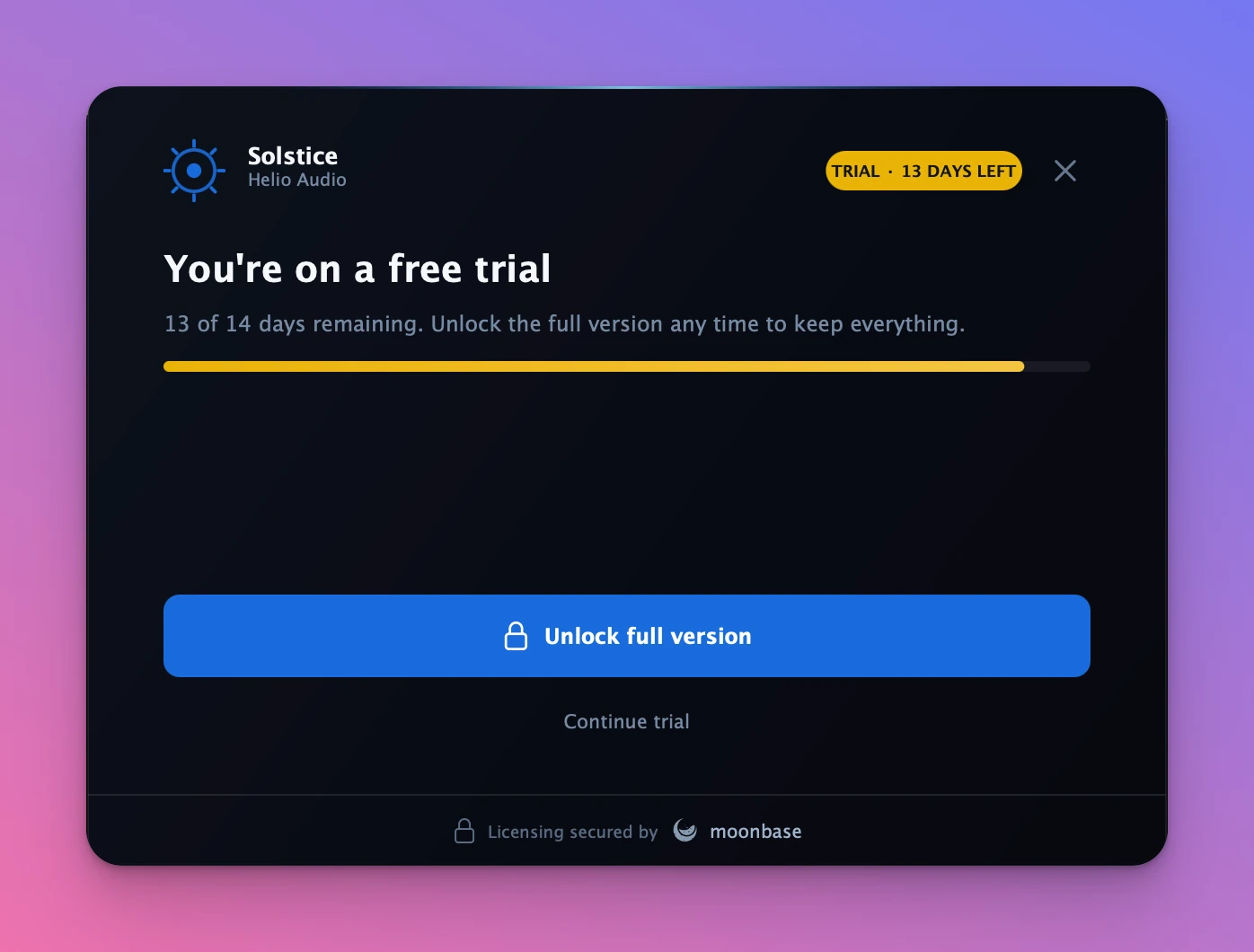
- Trial. Days remaining, a progress bar, the included and excluded feature lists, and an unlock action that routes into online activation. An endless trial shows no countdown, from v4.10.0 on. Earlier versions show it as 0 days left.
- Trial expired. A locked screen offering unlock or offline activation.
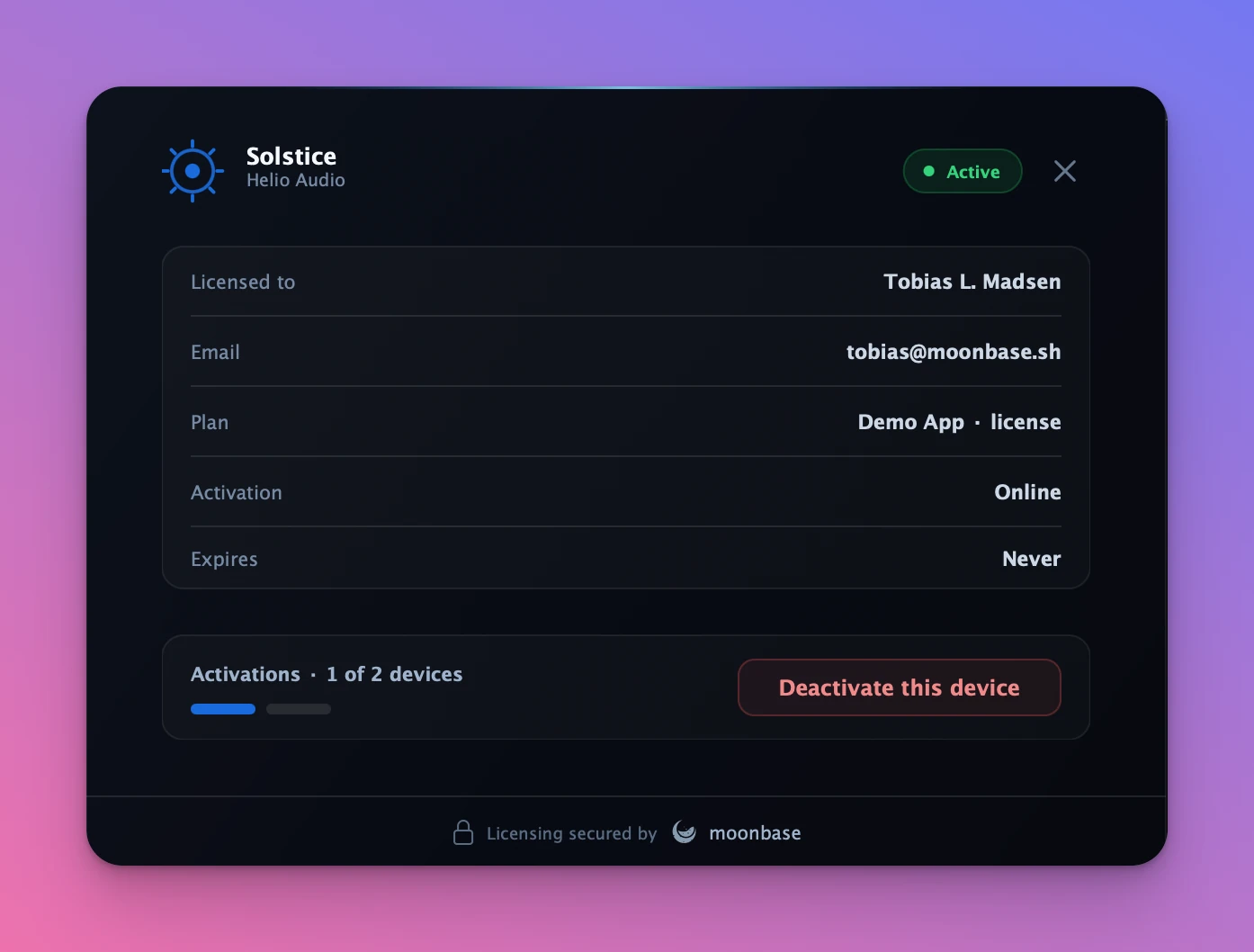
- License details. Who the license is issued to, the plan, activation type, expiry, a seat counter, and a deactivate action that releases the seat server-side.
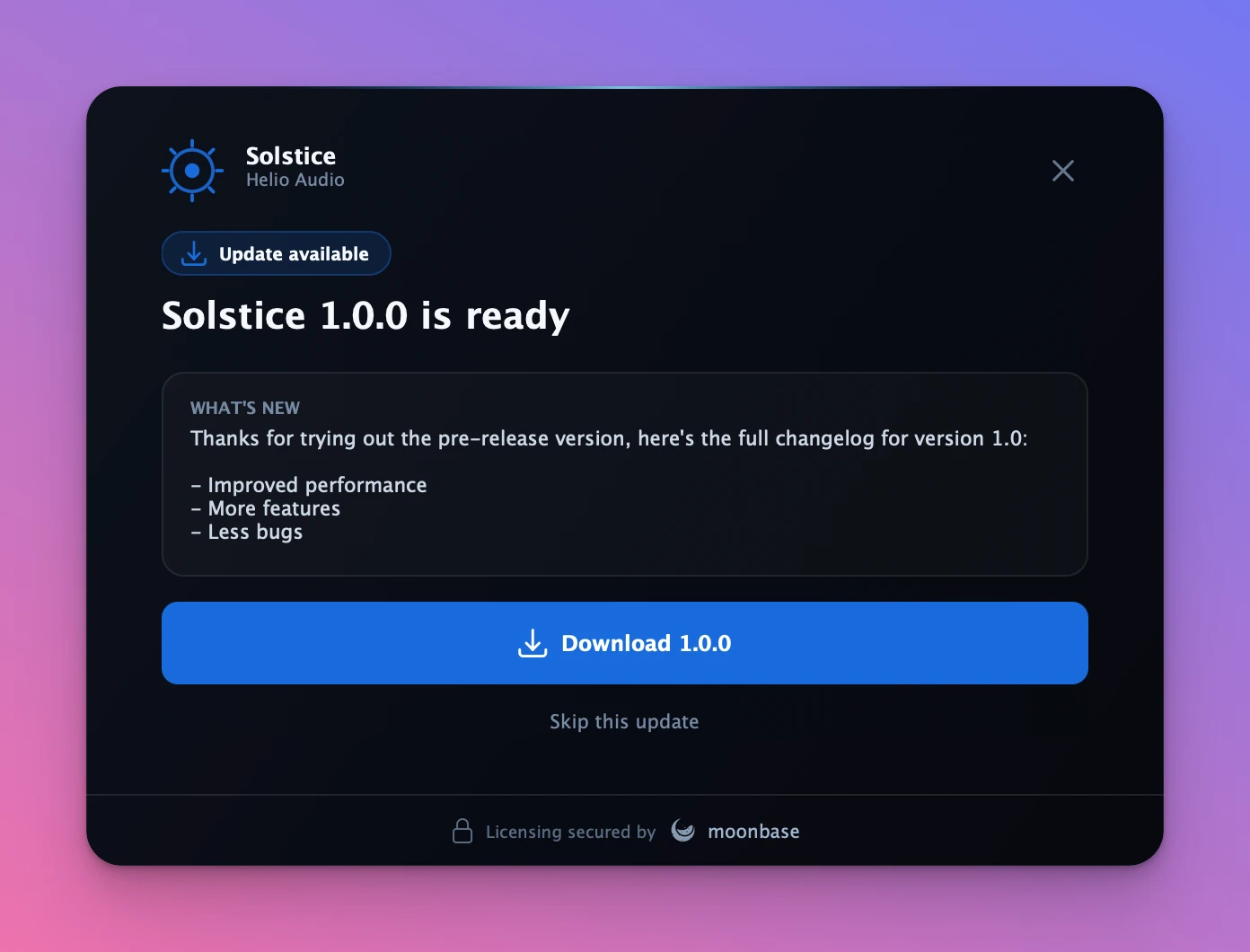
- Update available. Shown when the license reports a newer released version than the running build.
Network calls run on a controller-owned thread pool, while every state change and repaint happens on the message thread. Destroying the controller cancels any in-flight request and joins its workers, so you can call start() straight from an editor constructor and destroy the editor at any point, including during plugin scanning or rapid open and close, without guarding it.
Gating your plugin
In a plugin, license state has to outlive the editor. Give the processor the controller and let the editor share it, rather than re-syncing two copies:
// In your AudioProcessor:
ActivationController activation { makeConfig() };   // persistent
// activation.start();  // load any stored license

// In createEditor(): share the processor's controller with the UI.
auto* editor = new ActivationComponent (processor.activation);   // non-owning overload
Gate the audio thread on the lock-free flag:
void processBlock (juce::AudioBuffer<float>& buffer, ...) override
{
    if (! activation.licensedFlag().load())
        buffer.clear();
}
Or use LicenseGate for a click-free fade when the license state changes. The module never silences audio itself, so the gating stays yours:
LicenseGate gate;   // a member of your processor

void prepareToPlay (double sr, int) override
{
    gate.prepare (sr);
    gate.reset (activation.licensedFlag().load());
}

void processBlock (juce::AudioBuffer<float>& b, ...) override
{
    gate.process (b.getArrayOfWritePointers(), b.getNumChannels(), b.getNumSamples(),
                  activation.licensedFlag().load());
}
For richer decisions, controller().license() is the full moonbase::license, including trial, expires_at, issued_to.email, owned_sub_product_ids and any custom properties. Read it on the message thread. ActivationController is a juce::ChangeBroadcaster, so observing it means reading screen() and license() on change and repainting.
The validated license is persisted to userApplicationDataDirectory/<manufacturer>/<product>/license.mb, which you can override with config.licenseFile.
Offline activations
The offline flow is built into the Welcome and Offline screens, including drag-and-drop for the response file, so most integrations need no code at all. Set config.enableOffline = false to hide it.
If you are driving the controller from your own UI, the flow is three calls: saveOfflineRequest() writes the device token to a file the customer uploads, setOfflineResponse() takes the file they get back, and activateOffline() validates it locally and persists it. Offline licenses are permanent and are never re-validated against the API.
See Offline activations for the customer-facing side of the flow.
Branding and theming
Everything in ActivationConfig after the connection fields is presentation: the product and manufacturer names, an accent colour, a logo Drawable, overridable copy through config.strings, the trialLengthDays and trialFeatures list shown on the trial screens, the activation URL, and showMoonbaseBadge for the Moonbase co-brand in the footer.
config.accent           = juce::Colour(0xff186cdc);
config.logo             = juce::Drawable::createFromImageData(...);
config.trialLengthDays  = 14;
config.showMoonbaseBadge = false;
For a deeper re-skin, mutate ActivationLookAndFeel::palette, where every colour in the UI is an individual token, and point the heading, body and mono font helpers at your own typefaces.
In-app updates
A validated license carries the product's current released version in its claims. On launch and after every re-validation, the controller compares that against the running version and, when a newer release exists, shows the update screen instead of the license or trial screen. It loads the release notes from the Moonbase inventory API and downloads the installer for the current platform in-app, with progress.
config.applicationVersion = "2.3.1";   // or rely on JucePlugin_VersionString
config.enableUpdatePrompt = true;      // default, set false to never prompt
config.autoPresentUpdate  = true;      // default, present it when the plugin opens
config.downloadDirectory  = {};        // default, the user's Downloads folder
Downloads respect the release access-control level you set on the product. A trial cannot download from an owners-only release, so in that case the screen swaps the download button for an unlock call to action instead of letting the user hit a permission error. "Skip this update" is remembered until a newer version ships, and the license screen keeps a clickable Update available badge for anyone who dismissed it.
Device identity
By default the module identifies the device with moonbase::moonbase_device_id_resolver, which implements the cross-SDK Moonbase device fingerprint spec (version 2, ids stamped mbd2_). A license activated in a web or Electron app built on @moonbase.sh/licensing validates in your plugin, and the other way round.
Nothing is shelled out to and no privileged file is read, so the same id comes back inside a sandboxed host and whether or not the process is elevated. Inspect what it resolved to with controller().describeDevice(), which returns the id, spec version, platform tag, and the names of the contributing parameters but never their values. That is safe to put behind a "Copy diagnostics" button.
On iOS and Android there is no identifier that unrelated apps can read, so those platforms get a scoped id stamped mbd2s_, derived from identifierForVendor and ANDROID_ID. It is stable for the device within the platform's own scope, but it is deliberately not cross-SDK, and config.allowDeviceNameFallback is forbidden there rather than merely ignored.
Elsewhere, a machine with no usable hardware identity (a cloned VM image, a minimal container) fails activation rather than binding something weak. Set config.allowDeviceNameFallback = true to accept a weaker id derived from the computer name instead; those are stamped mbd2n_ so they can be told apart from real hardware bindings.
Supply your own resolver with config.deviceIdResolver when you need an application-specific device ID.
Upgrading a plugin that already shipped on 3.x. The device id changed in 4.0.0. Earlier versions used juce::SystemStats::getUniqueDeviceID(), so every already-activated user's license is bound to that value and will fail to validate, locking them out until they re-activate, which consumes a fresh activation seat and resets any device-scoped trial. One line avoids it:
config.deviceIdResolver = std::make_shared<moonbase::migrating_device_id_resolver>(
    // Current resolver, binds new activations. Pass the platform default, NOT
    // moonbase_device_id_resolver directly: on iOS and Android that has no
    // identity to read and throws, and a migrating resolver asks its current
    // resolver for an id before consulting any historical one, so hard-coding
    // it locks mobile users out of validation and activation.
    ActivationConfig::defaultDeviceIdResolver(),

    // Historical resolver, still accepted when validating existing licenses.
    std::make_shared<moonbase::juce_integration::legacy_juce_device_id_resolver>());
New activations bind the spec id, existing licenses keep validating, and the fleet migrates as devices naturally re-activate. Drop the wrapper in a later release. Because getUniqueDeviceID() is JUCE's own derivation rather than a published format, the historical resolver only vouches for a binding if the plugin still ships the JUCE version that created it, so do not combine this upgrade with a JUCE major bump.
Re-validation and entitlements
The module never polls on a timer. It validates on launch, and again whenever you ask it to, throttled to no more than once per onlineCheckInterval. A license stays usable offline until onlineGracePeriod elapses since its last successful online validation.
config.onlineCheckInterval = std::chrono::hours (1);       // default 5 minutes
config.onlineGracePeriod   = std::chrono::hours (24 * 30); // default 7 days
config.httpConnectTimeout  = std::chrono::seconds (5);
config.httpRequestTimeout  = std::chrono::seconds (15);
When a user buys something mid-session, an add-on or an upgrade, re-validate so the new entitlements load without a restart:
activation->controller().refreshLicense (/* force */ true, [] (bool refreshed) {
    if (refreshed)
        reloadFeatures();   // read controller().license() again
});
This runs asynchronously and silently, with no screen change. force bypasses the throttle, which is what you want straight after a purchase; pass false for a polite background re-check. A network failure is non-fatal: the current license is kept and the reason goes to the diagnostics sink.
Diagnostics and telemetry
The UI shows friendly, end-user-facing copy. To see the underlying reason behind a failure, whether that is bad configuration, a rejected token, an unreachable server or a failed write, wire up a diagnostic sink. It is invoked on the message thread.
config.onDiagnostic = [] (const juce::String& message) {
    juce::Logger::writeToLog ("[activation] " + message);
};
Telemetry is off by default. One flag attaches JUCE system and host metadata to every activation and validation request, and you can add fields of your own:
config.analytics.enabled = true;           // OS, CPU, JUCE version, memory
config.analytics.includeHostInfo = true;   // DAW host and plugin format
config.analytics.includeLocaleInfo = true; // language and region

config.metadata["app.channel"] = "beta";
config.onCollectMetadata = [] (std::map<std::string, std::string>& m) {
    m["cohort"] = abTestCohort();
};
Host and plugin fields are only captured when juce_audio_processors is part of the build, so they light up automatically in a plugin and are skipped in a plain app.
Sample app and reference plugin
A runnable standalone sample lives in the repository at examples/juce-native/ and runs against the public Moonbase demo account. It fetches JUCE on first configure and adds the module with juce_add_module, exactly the way a downstream project consumes it:
cmake -B build -DMOONBASE_BUILD_JUCE_NATIVE_EXAMPLE=ON
cmake --build build --target MoonbaseActivationNative
For a complete plugin, DRIFT is an open-source JUCE 8 audio plugin built around the module, with the full CMake setup, the processor-owned controller, and macOS and Windows release pipelines.
DRIFT, a JUCE 8 plugin using the moonbase_licensing module end to end.
The moonbase_licensing JUCE module and the C++ SDK it is built on.
The full module reference lives alongside the source.
The OnlineUnlockStatus bridge
There is a second JUCE integration path, built on the same core SDK: a copy-paste reference header that wraps juce::OnlineUnlockStatus. It has no UI of its own, and it is the right choice if your product is already built on OnlineUnlockStatus, or you are still on JUCE 7.
| Native module | OnlineUnlockStatus bridge | |
|---|---|---|
| Form | Drop-in JUCE module | Copy-paste reference header |
| Built-in UI | Yes, themeable and animated | No, you build it |
| JUCE integration | Native Moonbase API | juce::OnlineUnlockStatus wrapper |
| JUCE version | 8.0.4+ | 7+ |
| Device fingerprint | Spec v2, cross-SDK | Spec v2, cross-SDK |
| Third-party deps | None | Inherits the core SDK's CURL and OpenSSL |
| Entry point | ActivationComponent / ActivationDialog | MoonbaseUnlockStatus |
| Best for | New plugins wanting a ready-made UI | Products already on OnlineUnlockStatus, or JUCE 7 |
See the C++ SDK page for the bridge, and for using Moonbase licensing from non-JUCE C++ applications.