Vue.js SDK
This guide will get you all set up with our Vue.js SDK, ready to integrate pricing, payments, authentication and more into your storefront.
The Moonbase Vue.js SDK comes with a set of composables to let you easily access products & pricing, cart and authentication, customer inventory and more. It is made using TypeScript, so you will have typed models everywhere, but you can just as easily use it in your JavaScript projects.
Make sure to add your local development or test environment URLs to the whitelisted URLs of your Moonbase account. Otherwise, you will see CORS issues when calling endpoints.
If you want to see the SDK in use end-to-end, our Corino reference site is a complete Nuxt 4 storefront wired to the public Corino demo Moonbase account — landing page, embedded checkout, account area, license activation, and voucher redemption. The Reference implementation section at the bottom of this page walks through what it demonstrates.
Nuxt 4 reference storefront wired end-to-end to Moonbase: SSR catalog hydration, embedded checkout overlay, account area, license activation, and voucher redemption.
Getting started
Start by adding the package to your project:
npm install @moonbase.sh/vue --save
Then add it to your Vue.js app by passing the proper configuration:
main.ts
import { createStorefront } from '@moonbase.sh/vue'
import { createApp } from 'vue'
import App from './App.vue'

const storefront = createStorefront('https://{YOUR-ACCOUNT-ID}.moonbase.sh')

createApp(App)
  .use(storefront)
  .mount('#app')
Nuxt SSR support
The Moonbase Vue.js SDK is made to also support server side rendering. To avoid state leakage and support state hydration in Nuxt, you need to replace the state factory when instantiating the storefront. The appropriate place to configure this is through a Nuxt plugin:
plugins/moonbase.ts
import { createStorefront } from '@moonbase.sh/vue'

export default defineNuxtPlugin(async (nuxtApp) => {
    const storefront = createStorefront(
        nuxtApp.$config.public.moonbaseEndpoint,
        (key, state) => useState(key, () => state),
        { persistUtm: true },
    )

    // Hydrate the catalog (and current user, if a session cookie is present)
    // into the SSR payload so the first paint already has real data.
    if (import.meta.server)
        await storefront.updateStorefront()

    // Optional: react to checkout completion in the browser — for example,
    // redirect to an order-confirmation page.
    // if (import.meta.client) {
    //     storefront.onCheckoutCompleted((order) => {
    //         navigateTo(`/order-completed?id=${order.id}`)
    //     })
    // }

    nuxtApp.vueApp.use(storefront)
})
Passing Nuxt's useState as the state factory means every reactive store the SDK owns — catalog, current user, cart and inventory — is serialized from the server into the client payload. The SDK rehydrates from that payload on the client instead of refetching, so the first paint has real prices, product names and login state.
The { persistUtm: true } option stores detected UTM parameters in localStorage (instead of the default sessionStorage), which lets attribution survive across tabs and follow a visitor all the way through to a future checkout — useful when you've set up marketing revenue tracking.
onCheckoutCompleted only fires in the browser, so register it inside an import.meta.client branch. It's the right place to send users to an order-confirmation page or trigger any post-purchase cleanup. The handler pairs naturally with the embedded checkout overlay — see useCart below.
Composables
All composables use the same core storefront context that you set up using the above instructions.
useAuth
The useAuth composable contains functions to handle user authentication, as well as a computed property of the currently logged-in user and whether the user has been loaded yet.
import { useAuth } from '@moonbase.sh/vue'

const {
    user,
    loaded,
    signIn,
    signUp,
    signOut,        // 🔒 Needs authenticated user
    update,         // 🔒 Needs authenticated user
    setPassword,    // 🔒 Needs authenticated user
    forgotPassword,
    resetPassword,
    confirmAccount, // ! Returns password reset token to set initial password
    confirmEmail,
    confirmEmailChange, // 🔒 Needs authenticated user
} = useAuth()
If you turn on Captcha under Account settings > Storefront > Features, pass the customer's solution to signUp as { captchaToken } in its last argument, or it throws a CaptchaRequiredError. See Sign up in the Storefront API for how to draw the captcha.
The SDK will try to load the user on page load, if a valid user access token is found in localStorage. Refreshing the access token is also handled by the SDK, so you don't need to worry about refreshing tokens yourself.
useInventory
The useInventory composable exposes a number of endpoints to fetch customer inventory, or in other words; what products and licenses the authenticated customer owns.
To be able to build a fully self-service licensing experience, the composable also allows fetching activations for licenses, as well as revoke them on demand.
All of the methods from this composable requires an authenticated user, and all get methods returns paginated responses that needs to be iterated through.
If you are using offline activations, that can also be handled using the activateProduct endpoint, which takes in a device token and returns a license token usable for offline activations.
To learn more about offline activations, check out our documentation on activation flows.
import { useInventory } from '@moonbase.sh/vue'

const {
    getLicenses,
    getLicenseActivations,
    getProduct,
    getProducts,
    getProductLicenses,
    getProductActivations,
    revokeActivation,
    activateProduct,
    downloadProduct,
    getSubscription,
    getSubscriptions,
} = useInventory()
When setting up products in Moonbase, you have the ability to control who can download releases of your products: opening it up for everyone, requiring authenticated users, requiring downloaders to own the software, restricting downloads to the members of a customer group, or closing them to everyone.
That choice is made separately for past releases, the current release and pre-releases, so the same product can answer differently depending on which version is being downloaded.
In the case you pick anything but the first option, it's important that you use the downloadProduct method to fetch and open authenticated download links in order to avoid authentication errors for users of your storefront.
On the other hand, if you don't have any authorization policy in place, you can simply redirect users to the path of the product downloads as necessary.
Every owned product carries downloadsAllowed, the API's own verdict on whether the current customer clears every requirement for the release being returned, resolved by the same code the download endpoints enforce.
Gate your download UI on that flag rather than working eligibility out yourself: nothing in the customer model says which groups a customer belongs to, so a group-gated release is indistinguishable from an open one without it.
The downloadsNeedsUser, downloadsNeedsOwnership and downloadsNeedsGroupMembership flags next to it are there to pick which requirement you explain when the verdict is false. When all three are false as well, the release is closed to everyone.
The getProduct method returns the full owned-product detail for a single product the customer owns — downloads, external licenses (key codes, file licenses, iLok deposits), and metadata — and is what backs a per-product page in an account area. getSubscription returns the detail for a single subscription and is the handler for the ManageSubscription callback URL (see Custom storefront mode).
useActivationRequest
The useActivationRequest composable wraps an in-progress activation request, identified by a token. Moonbase issues these tokens to the AutoActivation custom-storefront URL when a customer kicks off an online activation from inside your application — either to redeem an offer (a paid license) or to start a free trial. The composable resolves the token to the underlying request, exposes eligibility and loading state, and returns methods to complete or abandon the flow.
import { useActivationRequest } from '@moonbase.sh/vue'

const {
    activationRequest, // computed ref of the loaded ActivationRequest
    loading,           // initial token resolve in progress
    fulfilling,        // a fulfill call is currently running
    completing,        // post-fulfill polling for the license to land
    error,             // user-facing error message, if any
    isInstalled,       // true once the resulting license is provisioned
    fulfillLicense,    // complete the request by purchasing / claiming the license
    fulfillTrial,      // complete the request by starting a free trial
    cancel,            // abandon the request server-side
} = useActivationRequest(token)
Typical usage is on an /activate page that reads ?token=… from the URL: pass the token to useActivationRequest, render the product and pricing from activationRequest.value, and wire two buttons to fulfillLicense() and fulfillTrial(newsletterOptIn) based on what the request is eligible for. After fulfillLicense(), the SDK opens the embedded checkout overlay for payment; after fulfillTrial(), the license is provisioned directly. In both cases isInstalled flips to true once the license has been delivered to the user.
Trial eligibility is exposed on activationRequest.value.trialEligibility. When the Moonbase account requires a newsletter opt-in to start a trial, trialEligibility.requiresNewsletterOptIn is true — in that case show a required opt-in checkbox in your UI and only enable the "Start trial" button once it's checked, then forward the value to fulfillTrial(true). When requiresNewsletterOptIn is false you can call fulfillTrial() directly (it defaults to false). The SDK takes care of updating the customer's communication preferences server-side before provisioning the trial.
For a deeper look at the activation flow this composable participates in, see activation flows. For a working /activate page, see activation/AutoActivation.vue in the Corino reference site.
useBundle
The useBundle composable returns a computed ref of a specific bundle specified by the bundle ID given.
import { useBundle } from '@moonbase.sh/vue'

const bundle = useBundle('demo-bundle')
The bundle will be null if it's not found in your publicly available bundles, or if the storefront data has not yet been loaded.
useBundles
The useBundles composable returns a computed ref of all currently loaded and available bundles.
import { useBundles } from '@moonbase.sh/vue'

const bundles = useBundles()
The bundle list will be empty if the storefront data has not yet been loaded.
useProduct
The useProduct composable returns a computed ref of a specific product specified by the product ID given.
import { useProduct } from '@moonbase.sh/vue'

const product = useProduct('demo-product')
The product will be null if it's not found in your publicly available products, or if the storefront data has not yet been loaded.
useProducts
The useProducts composable returns a computed ref of all currently loaded and available products.
import { useProducts } from '@moonbase.sh/vue'

const products = useProducts()
The product list will be empty if the storefront data has not yet been loaded.
useOffer
The useOffer composable returns a computed ref of a specific offer specified by the offer ID given.
import { useOffer } from '@moonbase.sh/vue'

const offer = useOffer('d6688961-7843-4bf4-be7c-4d9d6c5ce7be')
The offer will be null if it's not found, or if the storefront data has not yet been loaded.
useOffers
The useOffers and useEligibleOffers composables returns a computed ref of all offers and eligible offers respectively.
Eligible offers are offers where the condition of the offer is currently satisfied, and the promoted product is not already in the cart.
The useLockedOffers composable is the mirror of that: the item offers the cart has not unlocked yet, each paired with its progress towards the spend needed to unlock it, sorted so the closest one comes first.
Use it to nudge a customer towards an offer they are nearly qualified for.
Only offers gated on a cart total show up here, which is why progress is always an amount to spend rather than items to add.
An offer that just wants more of the same products is reached by adding what the cart already lists, so the storefront surfaces it as an upsell once it applies instead.
import { useEligibleOffers, useLockedOffers, useOffers } from '@moonbase.sh/vue'

const offers = useOffers()
const eligibleOffers = useEligibleOffers()
const lockedOffers = useLockedOffers()
These lists will be empty if the storefront data has not yet been loaded.
useCartOffer
The useCartOffer composable tracks the cart offer on the current order, which is the kind of offer that discounts the whole order once the cart clears a threshold rather than discounting a single item.
import { useCartOffer } from '@moonbase.sh/vue'

const cartOffer = useCartOffer()
It returns null until there is a cart to reason about, and otherwise an object with applied, next, subtotal and currency.
applied is the offer currently taking money off the order along with what it saves, and next is the offer just out of reach along with its progress.
Both can be set at the same time when you run tiered offers, in which case next is always worth more than what is already applied, so you can render a "spend a little more and save more" prompt without comparing the two yourself.
usePromotions
The usePromotions composable returns a computed ref of the sales currently running across your catalogue, so you can present a campaign in your own layout rather than using the banner the embedded storefront renders.
import { usePromotions } from '@moonbase.sh/vue'

const promotions = usePromotions()
Everything in this list is live and applies to the customer looking at the page right now: the validity window and the audience restriction are both evaluated server-side before the storefront is sent, so never filter the list again yourself. It does change when the customer signs in or out, since that changes who qualifies.
Each promotion carries the discount it applies, and that discount's promotionId is what ties it back to a price: a pricing variation only ever shows its single best discount, so check for promotionId on the variation's own discount to know which items a promotion is really pricing.
useCart
The useCart composable contains functions to handle cart manipulation, as well as a computed property of the current contents and value of the cart.
To avoid delays in rendering, the total of the cart contents is calculated client-side based on products added to the cart.
import { useCart } from '@moonbase.sh/vue'

const {
    items,
    currency,
    total,
    breakdown,
    cartOffer,
    addToCart,
    setQuantity,
    removeFromCart,
    checkout,
} = useCart()
Where total is the single number to put in front of the customer, breakdown is how it was arrived at: the original list price, the subtotal after product discounts and item offers, the cartOffer taken off on top of that, and the discount covering every saving whatever its source.
cartOffer is the same value lifted out for convenience, and is null when no cart offer applies.
The SDK takes care of storing the cart session in browser storage so that customers can resume shopping when coming back to the store. Also handled by the SDK is shopping in multiple tabs simultaneously, where the cart will be kept synchronized across the tabs.
Item offers reach a cart line when something hands one to addToCart, which in a storefront of your own means the customer pressing whatever you render for the offer.
Setting autoApplyItemOffers on the storefront context lets the cart attach an eligible offer to the line it discounts on its own instead:
const storefront = createStorefront('https://{YOUR-ACCOUNT-ID}.moonbase.sh')

if (storefront.autoApplyItemOffers)
    storefront.autoApplyItemOffers.value = true
It is false by default.
The property is optional on the StorefrontContext type so that a hand-rolled context is not forced to implement it, but one built by createStorefront always carries it.
It never adds anything to the cart and never replaces an offer a line already holds, so it only ever fills an empty slot on a line that is in the cart already, and it leaves alone any offer naming a product the customer has not added yet.
If you would rather do the pairing yourself, the helpers behind it are exported from @moonbase.sh/storefront-api as CartUtils.assignItemOffers, CartUtils.bestItemOffer, CartUtils.offerTargetsLine and OfferUtils.allTargetsInCart.
checkout() takes a redirect option that decides where checkout happens. The same option is accepted by useCheckout() and renewSubscription().
| Value | Behavior |
|---|---|
'auto' (default) | Overlay iframe on desktop and tablet, full-page redirect on phones. |
'always' / true | Always redirect to the Moonbase-hosted checkout. |
'never' / false | Always use the overlay iframe. |
'auto' exists because Apple Pay and Google Pay cannot render inside the overlay, and redirecting to the hosted checkout is what brings those wallets back. It takes that trade only on phones, where wallet usage concentrates, and keeps the overlay on desktop.
The overlay opens checkout in the current page, with no navigation and no full-page reload. That is the pattern the Corino reference site uses from its right-side cart drawer:
const cart = useCart()
const route = useRoute()

async function startCheckout() {
    await cart.checkout({ redirect: 'never', returnUrl: route.fullPath })
}
Pair the overlay with the onCheckoutCompleted and closeCheckout handlers exposed by createStorefront (see Nuxt SSR support): register an onCheckoutCompleted listener at boot to close the overlay and dismiss your cart drawer once an order completes.
A call that redirects cannot report an outcome, since the result only arrives once the customer is back, so it resolves with { completed: false, redirected: true }. Check redirected before treating completed: false as an abandoned checkout.
returnUrl is where a redirected customer comes back to, and is also used by any flow the backend wants to resume on the storefront side (for example confirming an order email). It defaults to the page the customer is on, query string and hash included. Moonbase strips its own mb_* parameters from whatever you pass, since the checkout appends its completion handshake to that URL.
useCommunicationPreferences
The useCommunicationPreferences composable wraps the public communications API — newsletter and product-update opt-ins for visitors who don't necessarily have a customer account yet. Use it to back a footer newsletter form, the confirmation page linked from a double-opt-in email, a "manage your preferences" page, and the one-click unsubscribe target.
import { useCommunicationPreferences } from '@moonbase.sh/vue'

const {
    subscribe,
    confirm,
    get,
    update,
    unsubscribe,
} = useCommunicationPreferences()
subscribe({ email, name, newsletter, productUpdates }) records the opt-in. With email confirmation turned on for your account, the call resolves with { status: 'confirmation_sent' } and Moonbase sends a double-opt-in confirmation email wherever the address has not been confirmed yet; with it turned off, the preferences are recorded directly and the call resolves with { status: 'subscribed' }. For a visitor who is not signed in, the status follows that setting rather than whether the email was already subscribed. newsletter and productUpdates both default to true.
confirm(email, token) redeems the confirmation token from the double-opt-in email and finalizes a pending subscription.
get(email, token) and update(email, token, { newsletter, productUpdates }) back the "manage your preferences" page — the token is the long-lived unsubscribe token included in every marketing email Moonbase sends. update lets a subscriber drop newsletters while keeping product updates (or vice versa); unsubscribe(email, token) is the all-off one-click target for email footers.
For the underlying REST surface, see the Communications section of the Storefront API reference.
useVoucher
The useVoucher composable contains functions to handle voucher redemption.
Vouchers are redeemable codes that grant licenses to products on redemption.
Since these are redemeed to a customer, redeeming a voucher will require an authenticated user.
See the useAuth composable for how to authenticate customers.
import { useVoucher } from '@moonbase.sh/vue'

const {
    peek,
    redeem, // 🔒 Needs authenticated user
} = useVoucher()
The returned payload from these methods contain details on which products and bundles have been redeemed by the voucher.
Custom storefront mode
A Moonbase account configured for custom storefront mode drives users back to merchant-controlled URLs for the flows Moonbase normally handles on its own hosted customer portal — license activation, sign-in callbacks, email confirmations, password resets, product downloads, and subscription management. Each entry in the account's CustomStorefrontLocations settings maps to a path on your storefront origin; the backend appends the listed query parameters and redirects the user there.
When you build a custom storefront on this SDK, you implement one page per row in the table below. Pick the SDK call from the right-hand column and feed it the query params from the URL.
| Account setting | Suggested path | Query params | SDK call to invoke |
|---|---|---|---|
AutoActivation | /activate | token | useActivationRequest(token).fulfillLicense() or .fulfillTrial(optIn) |
OfflineActivation | /activate | (none) | useInventory().activateProduct(deviceToken, ActivationMethod.Offline) |
LogIn | /login | (none) | useAuth().signIn(email, password) |
ConfirmAccount | /sign-up | email, code | useAuth().confirmAccount(email, code) |
ConfirmEmail | /confirm-email | email, code | useAuth().confirmEmail(email, code) |
ConfirmEmailChange | /account/confirm-email-change | email, code | useAuth().confirmEmailChange(email, code) |
ResetPassword | /forgot-password | email, code | useAuth().forgotPassword(email) or .resetPassword(email, code, password) |
DownloadProduct | /download | product_id, optional version and key | useInventory().downloadProduct(...) (typically after a redirect to a product page) |
Checkout | (optional) | — | leave unset and use the embedded overlay via useCart().checkout({ redirect: 'never' }) |
ManageSubscription | /subscriptions | subscription_id | useInventory().getSubscription(subscriptionId) |
The paths are suggestions — the only requirement is that whatever path you configure on your Moonbase account matches the route you implement. For working implementations of every row above, see the Corino reference site below.
Reference implementation: Corino
For a complete, end-to-end example of the Vue SDK powering a real custom storefront, see the open-source Corino reference site — a Nuxt 4 build for a fictional Oslo audio-plugin company wired to the public corino-demo.moonbase.sh Moonbase account. It exists specifically as a demonstration of what it takes to ship a custom storefront on this SDK: marketing landing page, cart drawer, embedded checkout, account area, product downloads, license activation, and voucher redemption — with the catalog and user state hydrated into the SSR payload so the first paint is real data.
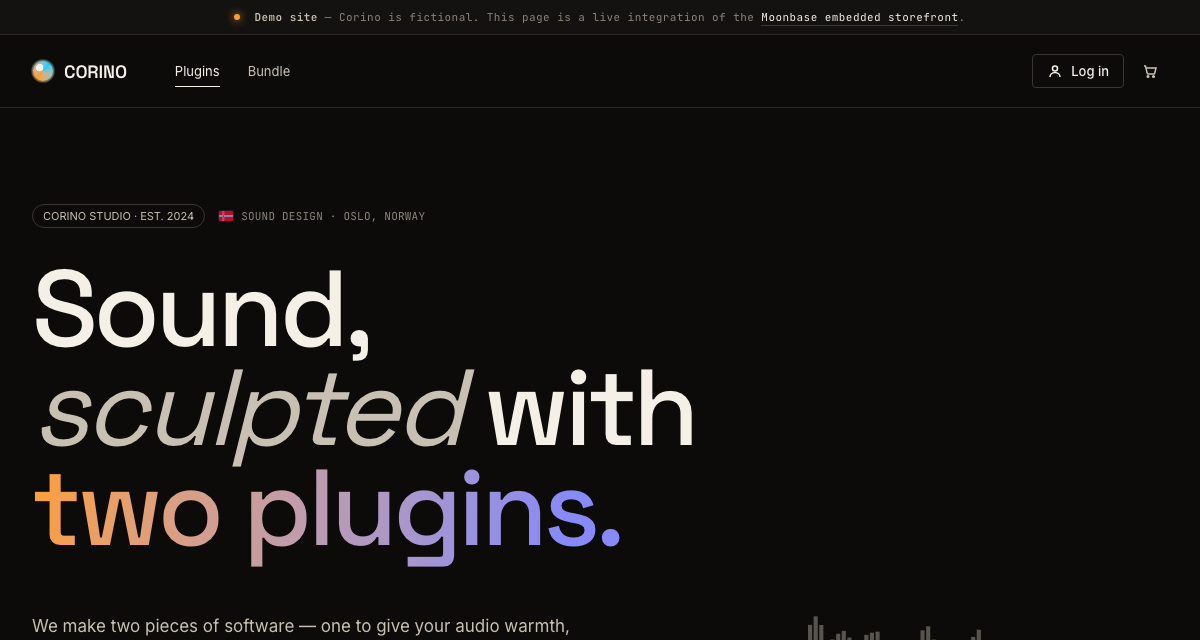
Try it live at corino-vue.moonbase.sh — sign up with any email, add a plugin to your cart, and walk through the embedded checkout against the demo Moonbase account. Then read the source — the repo shows how to wire every composable on this page into a working storefront:
- SSR plugin boot (
app/plugins/moonbase.ts) with theuseStatefactory,{ persistUtm: true }, server-sideawait updateStorefront(), and a browser-onlyonCheckoutCompletedcleanup. - Live-bound pricing and ownership-aware CTAs via
useProduct/useBundleinPluginCard.vueandBundleSection.vue— the same card swaps its "Add to cart" button for "Download" once the user owns the product. - Embedded checkout overlay opened from a right-side cart drawer (
CartDrawer.vue) viacart.checkout({ redirect: false })and torn down viaonCheckoutCompleted+closeCheckout. - Account area at
/accountwith nested routes for profile (useAuth().update/setPassword/signOut), owned products (useInventory().getProducts), per-product downloads and activations (getProduct,downloadProduct,getProductActivations,revokeActivation,getProductLicenses), and voucher redemption (useVoucher().redeem). - License activation at
/activatecovering both modes — the online?token=flow viauseActivationRequest(token), and the offline machine-file upload viauseInventory().activateProduct(token, ActivationMethod.Offline), which returns adata:URL for the resulting license file. - Custom-storefront callback pages for every row in the table above —
/login,/sign-up,/confirm-email,/forgot-password(request + reset modes),/download,/subscriptions, and/account/confirm-email-change. - Deep-link auto-add-to-cart via
?add_product=…/?add_bundle=…handled inapp.vue, so marketing links can drop visitors straight into the cart drawer.
Nuxt 4 reference storefront demonstrating the Vue SDK end-to-end against the public Corino demo Moonbase account.
If you want a much smaller integration with no build step, the embedded storefront docs cover a separate single-file HTML reference site for the same fictional shop.