C++ SDK
A header-only C++17 SDK for integrating Moonbase license activation into your native applications. It runs on Windows, macOS, and Linux, and ships with two JUCE integration paths for plug-in developers.
The SDK is open-source under the MIT license and lives at Moonbase-sh/moonbase-cpp. It exposes the activation primitives directly, so you can use it from any C++ application: CLI tools, Qt apps, custom plug-in formats, or JUCE plug-ins through the JUCE module that ships in the same repository.
It supports:
- Browser-based activations with polling
- Local RS256 JWT validation against an embedded public key
- Online re-validation with configurable cadence and grace period
- Cross-SDK device identity implementing the Moonbase device fingerprint spec, so an activation made from a web or Electron app validates in your native app
- Overridable license storage (in-memory by default, file-backed store included)
- Server-side activation revocation
- Two JUCE paths: the drop-in
moonbase_licensingmodule with a built-in activation UI, and a copy-paste bridge wrappingjuce::OnlineUnlockStatus
Requirements
- CMake 3.20 or newer
- A C++17 compiler
- Windows, macOS, or Linux
CURL::libcurland OpenSSL (OpenSSL::SSL,OpenSSL::Crypto)nlohmann_json3.11+ — fetched automatically if not found on the system
Installation
The fastest way to consume the SDK is through CMake's FetchContent. For a system-wide install, build and install from source and pick it up with find_package. For vendored copies in your repo, add_subdirectory works the same way as FetchContent.
include(FetchContent)
FetchContent_Declare(moonbase_cpp
    GIT_REPOSITORY https://github.com/Moonbase-sh/moonbase-cpp.git
    GIT_TAG v4.0.0)
set(MOONBASE_BUILD_TESTS OFF)
set(MOONBASE_BUILD_EXAMPLES OFF)
FetchContent_MakeAvailable(moonbase_cpp)

target_link_libraries(your_app PRIVATE moonbase::licensing)
The exported moonbase::licensing target propagates the include directory and transitive dependencies on libcurl, OpenSSL, and nlohmann_json, so your project doesn't need to repeat find_package for any of them.
Building the SDK as a top-level project also produces moonbase_device_id, a diagnostic that prints the current machine's device ID and how it was derived. Enable it in a subproject build with -DMOONBASE_BUILD_DEVICE_ID_TOOL=ON.
Basic usage
Configure the SDK with your account endpoint, product ID, and embedded RS256 public key, then request an activation and poll until it's fulfilled in the browser:
#include <moonbase/moonbase.hpp>

moonbase::licensing_options options;
options.endpoint = "https://your-account.moonbase.sh";
options.product_id = "your-product";
options.public_key = embedded_public_key_pem;
options.account_id = "account-id"; // optional issuer check

moonbase::licensing licensing(options);

auto request = licensing.request_activation();
std::cout << "Open: " << request.browser_url << "\n";

std::optional<moonbase::license> license;
while (!license) {
    std::this_thread::sleep_for(std::chrono::seconds(1));
    license = licensing.get_requested_activation(request);
}

licensing.store().store_local_license(*license);
The default license store is in-memory. Wire up moonbase::file_license_store (or your own implementation) to persist licenses across launches — see Custom fingerprinting and storage below.
Startup validation
On every launch, run validate_token_online against the stored token. It performs the local checks first (signature, device fingerprint, expiry) and then re-validates against the Moonbase API as needed:
if (auto local = licensing.store().load_local_license()) {
    auto validated = licensing.validate_token_online(local->token);
    licensing.store().store_local_license(validated); // persist refreshed token
}
Two licensing_options knobs control API cadence and offline tolerance:
online_validation_min_interval(default 5 minutes) — skip the API call when the localvalidated_atis newer than this. Keeps the method cheap to call frequently.online_validation_grace_period(default 7 days) — maximum age the local token may reach without a successful online check. Within grace, transient transport failures fall back to the cached local result; beyond grace, the failure propagates.
Definitive server rejections (license_invalid_error, license_expired_error) always propagate regardless of grace. Offline-activated tokens (activation_method::offline) are validated locally even from validate_token_online — the SDK never contacts the API for them. Use validate_token_local directly when you only want the local check.
Revoking activations
Wire revoke_activation to a Deactivate or Sign out button so users can free up the activation seat for the current device:
if (auto local = licensing.store().load_local_license()) {
    licensing.revoke_activation(local->token);
}
On success the SDK tells the server to release the seat and clears the matching license from the local store. Revoke is only meaningful for online-activated paid licenses; calling it for offline or trial tokens raises operation_not_supported_error without contacting the API.
Custom device IDs and storage
The default device ID resolver, moonbase::moonbase_device_id_resolver, implements the cross-SDK Moonbase device fingerprint spec, reading SMBIOS on Windows, IOPlatformUUID on macOS, and machine-id plus world-readable DMI fields on Linux. Because every Moonbase SDK computes the same ID, an activation made from a web or Electron app validates in your native app and the other way round. Override it when you need an exact legacy fingerprint or any other application-specific device ID:
class my_resolver final : public moonbase::device_id_resolver {
public:
    std::string device_name() const override { return "Studio Mac"; }
    std::string device_id() const override { return "stable-device-id"; }
};

auto store = std::make_shared<moonbase::file_license_store>("licenses/license.mb");
auto resolver = std::make_shared<my_resolver>();
moonbase::licensing licensing(options, store, resolver);
A custom resolver's ID is compared literally, so it does not need to follow the spec's mbd2_ stamp format, and it gives up cross-SDK compatibility by definition.
These types were renamed in 4.0.0: fingerprint_provider is now device_id_resolver, static_fingerprint_provider is static_device_id_resolver, and licensing::fingerprint() is licensing::device_resolver(). The old names remain as deprecated aliases and will be removed in 5.0.0. Define MOONBASE_DISABLE_DEPRECATED_ALIASES to find every remaining use in your codebase.
file_license_store persists a JSON representation of the validated license at the path you give it. For per-user storage, point it at your platform's app-data directory (e.g. ~/Library/Application Support/YourApp/license.mb on macOS).
JUCE integration
There are two JUCE paths, both built on the same moonbase::licensing core SDK.
The moonbase_licensing module is the recommended choice for new projects. It's a drop-in JUCE 8 module with a built-in, themeable activation UI and no third-party dependencies, and it ships in this same repository under modules/moonbase_licensing/. See the JUCE Module page for the full guide.
The OnlineUnlockStatus bridge below is the alternative for products already built on juce::OnlineUnlockStatus, teams still on JUCE 7, or anyone who would rather build their own activation UI against the core SDK.
OnlineUnlockStatus bridge
The SDK includes a copy-paste bridge under examples/juce/MoonbaseJuceBridge.h. It provides:
moonbase::juce_bridge::MoonbaseUnlockStatus— subclass ofjuce::OnlineUnlockStatusdriven by Moonbase's JWT flow.MoonbaseJuceDeviceIdResolver: sources the device ID fromjuce::SystemStats::getUniqueDeviceID()instead of the spec fingerprint, for products that already bound licenses to it.applyJuceMetadata(options)— populates activation metadata from JUCE's system and host helpers (DAW, plug-in format, OS, CPU, JUCE version).tryLoadStoredLicenseAsync(callback)— non-blocking startup validation. State mutation and the callback are always marshalled to the JUCE message thread, so it's safe to call fromAudioProcessor's constructor.revokeActivationAsync(callback): releases the device's activation seat server-side, for a Deactivate or Sign out control.
A runnable standalone example ships with the SDK and is opt-in to avoid pulling JUCE into your build by default:
cmake -B build -DMOONBASE_BUILD_JUCE_EXAMPLE=ON
cmake --build build --target MoonbaseJuceExample
Reference implementation: HALO by Corino
For a complete, end-to-end example of the JUCE bridge wired into a real application, see the open-source HALO reference app. It's a JUCE 8 standalone built to look like a harmonic saturator plug-in — transfer curve, drive knob, animated I/O meters — but it doesn't process audio. The whole point of the project is the surrounding license-gate workflow: synchronous local JWT check on launch so the UI unlocks immediately, async online re-validation against the Corino demo account on a background thread, and a cog-menu Sign out that calls revokeActivationAsync to release the seat server-side.
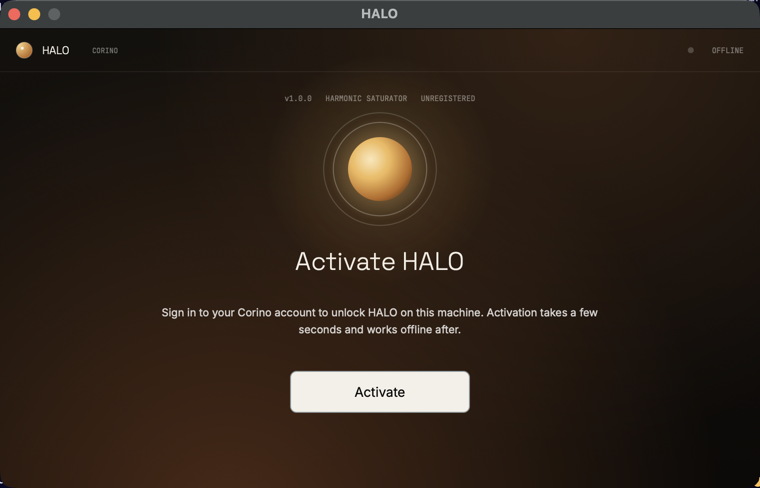
HALO demonstrates the full set of bridge features in a shippable shape — tryLoadStoredLicenseAsync on startup, the browser activation handshake, file-backed license storage under ~/Library/Application Support/Corino/HALO/, and revokeActivationAsync wired to a UI control. It also includes the macOS + Windows CI and release pipeline that publishes signed builds straight to the Moonbase account as product downloads.
A JUCE 8 standalone reference app demonstrating moonbase-cpp end-to-end against the public Corino demo account.
For the equivalent reference on the module path, see DRIFT on the JUCE Module page.
Releases and source
The SDK is MIT-licensed and follows Conventional Commits — every push to main is released automatically by semantic-release, with versioned GitHub Releases and source tarballs at https://github.com/Moonbase-sh/moonbase-cpp/archive/refs/tags/v<version>.tar.gz.
Header-only C++17 SDK for Moonbase license activation, plus the moonbase_licensing JUCE module.