External licensing systems
If you have pre-existing software that relies on other licensing systems than Moonbase, you can integrate the two. We support two main paths to achieve this integration:
- Using pre-uploaded key codes
- Using a HTTP API generator
To make it easier to transition between systems, our HTTP API generator supports several protocols:
- A modern JSON-based API integration with HMAC security signatures
- Compatibility modes for popular platforms like Fastspring, MyCommerce, DigitalRiver, ShareIt and others
If you are building APIs for your own licensing backend, using our JSON-based integration is highly recommended, but if you are transitioning from other payment providers, our compatibility mode might let you move over without any changes necessary in your backend systems.
Do you have a specific scenario you need to support or other questions?
Reach out to us through the support channel, or at developers@moonbase.sh.
Pre-uploaded key codes
In the case your licensing system can pre-generate arbitrary key codes for activating your software, you may opt to use our key code list feature. To get started with this, simply choose the "Key Codes" generator on your product in Moonbase:
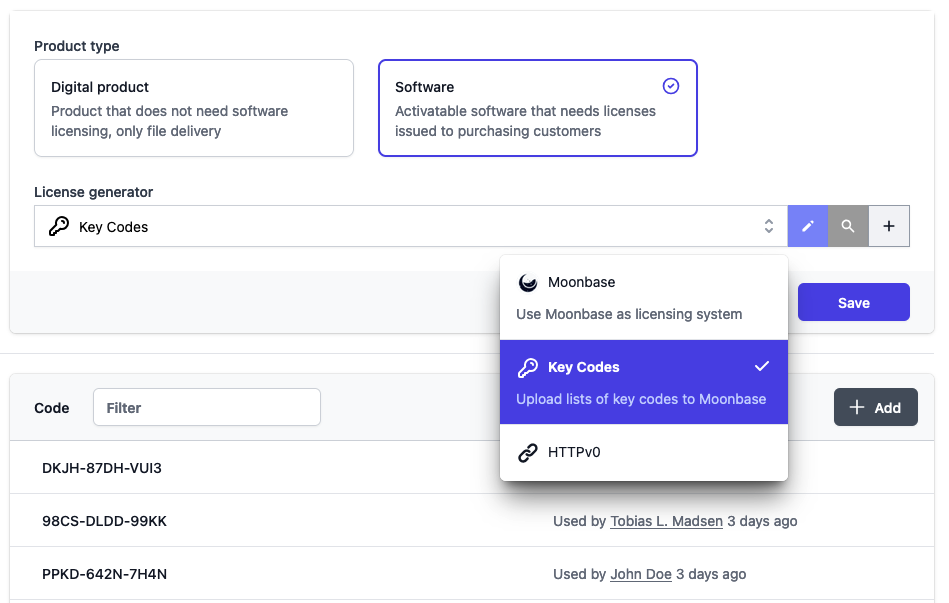
At this point, you may start uploading as many key codes as you wish to be used for future purchases. The product overview will indicate whether or not a product has enough key codes remaining, and it's your responsibility to ensure codes don't run out.
HTTP generator
Using our HTTP generator means that Moonbase will call your API on customer purchases to fulfill the order with licenses. It's important that your API is always available, so that customers will get access to products when they make their payment. The API call has a timeout of 5 seconds, and will retry up to 3 times if a failure code is returned.
Your endpoint should be able to handle the request payload, and return a JSON object with licenses per product:
Request payload
- Name
type- Type
- enum(Order|Voucher|License)
- Description
The type of fulfillment being requested,
Orderbeing purchases,Voucherbeing voucher redemptions andLicensebeing manual license provisioning from the Moonbase app.
- Name
reference- Type
- string
- Description
A reference to the Order/Voucher/License being fulfilled, this will be unique across all fulfillment requests your backend may receive.
- Name
customer- Type
- object
- Description
Details about the customer who initiated the fulfillment, it may have the following fields:
- Name
id- Type
- string
- Description
Globally unique customer ID for this customer.
- Name
name- Type
- string
- Description
Full name of the customer.
- Name
businessName- Type
- string
- Nullability
- nullable
- Description
If the customer is a business, this will have the name of the business.
- Name
taxId- Type
- string
- Nullability
- nullable
- Description
If the customer is a business, this will have the tax ID of the business if given.
- Name
email- Type
- string
- Description
Email address of the customer, this is always present and used as the login for the customer. Do note that Moonbase supports customers changing the email address of their account.
- Name
address- Type
- object
- Nullability
- nullable
- Description
The billing address of the customer if given:
- Name
countryCode- Type
- string
- Description
ISO 3166-1 alpha-2 two-letter country code.
- Name
streetAddress1- Type
- string
- Description
First line of the regular street address.
- Name
streetAddress2- Type
- string
- Optionality
- optional
- Description
Second line of the regular street address.
- Name
postCode- Type
- string
- Description
Postal code of the address.
- Name
locality- Type
- string
- Description
Locality of the address, only required if no region is given.
Also known asCity.
- Name
region- Type
- string
- Description
Region of the address, only required if no locality is given.
Also known asState.
- Name
requests- Type
- array<object>
- Description
A list of license requests with objects of the following shape:
- Name
productId- Type
- string
- Description
The ID of the product that needs licenses.
- Name
quantity- Type
- number
- Description
The number of licenses that is requested.
- Name
expiresAt- Type
- string
- Nullability
- nullable
- Description
ISO 8601 timestamp for when the issued licenses should expire. Present for subscriptions and other time-limited products, and omitted for perpetual licenses. This value already includes any grace period configured on the product.
- Name
subscription- Type
- object
- Nullability
- nullable
- Description
Present when the request fulfills a subscription, and omitted for one-off purchases. It may have the following fields:
- Name
subscriptionId- Type
- string
- Nullability
- nullable
- Description
The ID of the subscription this license belongs to.
- Name
interval- Type
- enum(Daily|Weekly|Monthly|Quarterly|Yearly)
- Nullability
- nullable
- Description
The billing interval of the subscription.
- Name
currentPeriodEnd- Type
- string
- Nullability
- nullable
- Description
ISO 8601 timestamp for the end of the current billing period (the renewal boundary). This does not include any grace period.
- Name
licenseExpiresAt- Type
- string
- Nullability
- nullable
- Description
ISO 8601 timestamp for when the license actually stops working. For active subscriptions this is
currentPeriodEndplus the configured grace period, and for cancelled subscriptions it equalscurrentPeriodEnd.
- Name
status- Type
- enum(Active|Cancelled|Expired|Completed)
- Nullability
- nullable
- Description
The current status of the subscription. An initial purchase is always reported as
Active.
- Name
currentCycle- Type
- number
- Nullability
- nullable
- Description
The number of the current billing cycle of the subscription. Cycles are 1-based, so an initial purchase is cycle
1, the first renewal is cycle2, and so on.
For perpetual products both expiresAt and subscription are omitted. For subscriptions, an initial purchase reports status as Active and currentCycle as 1, while renewals report the subscription's current values. Treat every subscription field as optional, since each is sent only when it is known.
Request
POST https://license-backend.your-domain.example/fulfill
Content-Type: application/json
X-Signature: HNA0AVKUMOF5CXC8GKELYVYTYK37Q4ONGLJEL2TJTGA=

{
    "type" : "Order",
    "reference" : "b28f721c-c29a-4fc4-9153-04f128283c51",
    "customer" : {
        "id" : "2d473e34-fc59-4e6e-9f38-4ad379baa8e9",
        "name" : "John Doe",
        "businessName" : null,
        "taxId" : null,
        "email" : "john.doe@example.com",
        "address" : null
    },
    "requests" : [
        {
            "productId" : "example-product",
            "quantity" : 3,
            "expiresAt" : "2026-07-14T12:44:00Z",
            "subscription" : {
                "subscriptionId" : "f6a3c1e2-9b7d-4c3a-8e21-2b9f0a4d7c11",
                "interval" : "Monthly",
                "currentPeriodEnd" : "2026-07-14T10:44:00Z",
                "licenseExpiresAt" : "2026-07-14T12:44:00Z",
                "status" : "Active",
                "currentCycle" : 2
            }
        }
    ]
}
Expected response
When responding to license requests, your backend should respond with a dictionary where the key is the product ID being fulfilled, and the value an array of licenses to issue to the customer.
Each license returned may either be a string which can contain line feed characters, but should not contain any sort of rich text content or HTML, or a file. In case you return a file object, make sure to include all of the following fields:
- Name
fileName- Type
- string
- Description
The name of the file being returned, including file extension.
- Name
contentType- Type
- string
- Description
The MIME type of the file being returned, e.g.
application/pdf.
- Name
data- Type
- string
- Description
The file data, encoded as a Base64 string.
In the example response listed, we return three licenses for the product with ID example-product, where the first two are simple license keys represented as strings, and the third is a text file containing the license key.
It's imperative that the number of values in the list matches the requested quantity of licenses for the given product.
Response
{
    "example-product" : [
        "LICENSE-KEY-1",
        "LICENSE-KEY-2",
        {
            "fileName" : "license-key-3.txt",
            "contentType" : "text/plain",
            "data" : "TElDRU5TRS1LRVktMw=="
        }
    ]
}
Revoking licenses
Besides fulfilling orders, Moonbase can notify your backend whenever a license is revoked, so you can deactivate it in your own system as well. This is optional: when configuring the HTTP generator, set a separate Revocation Endpoint URL. When it's set, Moonbase sends a revocation request to it whenever a license is revoked, either manually from the Moonbase app or automatically when an order is refunded. When an order is only partially refunded, only the licenses for the refunded units are revoked, so you will receive revocation requests for those licenses only. If you leave the Revocation Endpoint blank, revocations are not forwarded and no action is taken on your backend.
Revocation requests are signed with the same HMAC-SHA256 signature as fulfillment requests (see the Security section below) and are retried up to 3 times on failure.
Acknowledge a revocation by returning any 2xx status code; no response body is required.
Because Moonbase may retry, your handler should be idempotent.
- Name
type- Type
- enum(License)
- Description
The type of request, this is always
Licensefor revocations.
- Name
reference- Type
- string
- Description
The ID of the license being revoked.
- Name
customerId- Type
- string
- Description
The ID of the customer who owns the license.
- Name
productId- Type
- string
- Description
The ID of the product the license is for.
- Name
license- Type
- string | object
- Description
The license content originally issued for this license, in the same form your backend returned it during fulfillment: either a string, or a file object with
fileName,contentTypeanddata. Use this to identify which license to deactivate.
- Name
subscription- Type
- object
- Nullability
- nullable
- Description
Present when the revoked license belongs to a subscription, using the same shape as the
subscriptionobject on fulfillment requests above. Omitted for one-off licenses.
Revocation request
POST https://license-backend.your-domain.example/revoke
Content-Type: application/json
X-Signature: HNA0AVKUMOF5CXC8GKELYVYTYK37Q4ONGLJEL2TJTGA=

{
    "type" : "License",
    "reference" : "8f2c1b4e-3a6d-4f51-9c7a-1d2e3f4a5b6c",
    "customerId" : "2d473e34-fc59-4e6e-9f38-4ad379baa8e9",
    "productId" : "example-product",
    "license" : "LICENSE-KEY-1",
    "subscription" : {
        "subscriptionId" : "f6a3c1e2-9b7d-4c3a-8e21-2b9f0a4d7c11",
        "interval" : "Monthly",
        "currentPeriodEnd" : "2026-07-14T10:44:00Z",
        "licenseExpiresAt" : "2026-07-14T10:44:00Z",
        "status" : "Cancelled",
        "currentCycle" : 4
    }
}
Security
To ensure your fulfillment and revocation endpoints are secure and safe from request forgery, we attach a signature to every fulfillment and revocation request being sent. This signature is using a HMAC-SHA256 authentication code using the secret set up while configuring the generator in the Moonbase app. Using the raw request body and the secret, you can calculate a signature, and make sure that the signature you calculate is the same as ours.
Example signature verification code
    using var algorithm = new HMACSHA256(Encoding.UTF8.GetBytes(expectedSecret));
    var json = await request.Content.ReadAsStringAsync();
    var hash = algorithm.ComputeHash(Encoding.UTF8.GetBytes(json));
    var signature = Convert.ToBase64String(hash).ToUpperInvariant();
    var sentSignature = request.Headers.GetValues("X-Signature").Single();
    Assert.Equal(sentSignature, signature);
If you're using out compatibility modes for other platforms, security patterns may differ. Reach out to us for more information about maintaining secure endpoints for license fulfillment.