Automate product releases with GitHub Actions
This guide will show you how to automatically release new versions of your software built in GitHub Actions on Moonbase, either in a single command with the Moonbase CLI or by calling our core API yourself.
Getting started
To access the API for your account, start by creating an API key if you don't have one already under Account settings > Developer. API keys allow access to a slew of endpoints documented in our Core API reference, and can be used by adding an Api-Key header to your requests. If you restrict the key, releasing needs Read & write access to products, and nothing else.
In GitHub Actions, store the key as a repository secret, like MOONBASE_API_KEY, rather than in the workflow file.
Using the Moonbase CLI
The quickest way to publish a release is the Moonbase CLI. One command uploads your files, creates the release from them, and can publish it straight away. It runs through npx, so all it needs is Node.js 20 or later, which GitHub's hosted runners already have.
The CLI reads your account's address from MOONBASE_ENDPOINT and your API key from MOONBASE_API_KEY:
export MOONBASE_ENDPOINT=https://demo.moonbase.sh
export MOONBASE_API_KEY=mb_a52c7...

npx @moonbase.sh/cli release example-product v1.0.0 "dist/Example Setup.exe" "dist/Example.dmg" --notes-file NOTES.md --publish
This uploads both files, creates release 1.0.0 of example-product from them, and publishes it. Along the way:
- The version is
MAJOR.MINOR.PATCH. A leadingvis dropped, so a Git tag likev1.0.0works as it is. - Each download is named after its file.
- A file's platform is guessed from its extension (
.dmgand.pkgare Mac,.exeand.msiWindows,.deb,.rpmand.AppImageLinux), then from a word in its name (mac,win,linux), and is Universal otherwise. Its architecture is guessed from a word in its name (arm64,x64,x86_64,universaland the like) and is left out otherwise. The CLI lists what it guessed before it uploads, and--platformand--archset them for every file instead. - Before it uploads anything, it checks that the product exists, that the release doesn't already exist (unless you pass
--add), and that every file is there. - Large files are uploaded in parts, and a part that fails is retried.
Without --publish, the release stays unpublished, so you can check it over and publish it from the Moonbase app yourself. The release command takes these options:
| Option | Description |
|---|---|
--notes <text> | The release notes |
--notes-file <path> | Read the release notes from a file |
--platform <name> | Universal, Windows, Linux, Mac, iOS or Android |
--arch <name> | Universal, X86, X64, Arm or Arm64 |
--publish | Publish the release, so customers can download it. Without it the release stays unpublished. |
--add | If the release exists, add the files to it. A file with the same name, platform and architecture as one already there replaces it. |
--json | Print the release as JSON |
--endpoint <url> | Your account's address, instead of MOONBASE_ENDPOINT |
--api-key <key> | An API key, instead of MOONBASE_API_KEY |
Two more commands round it out: publish <product-id> <version> publishes a release that already exists, and upload <file> uploads a single file and prints its key, for when you build the release through the core API yourself. Run npx @moonbase.sh/cli help <command> to see a command's options.
Release on a version tag
This workflow builds your software and publishes a release on Moonbase whenever you push a version tag like v1.0.0:
name: Moonbase release

on:
  push:
    tags: ['v*']

jobs:
  release:
    runs-on: ubuntu-latest

    steps:
      - name: Checkout
        uses: actions/checkout@v4

      - name: Build application
        run: make build # This depends on how you build your binaries, and should put them in dist/

      - name: Release on Moonbase
        run: npx @moonbase.sh/cli release example-product ${{ github.ref_name }} dist/* --publish
        env:
          MOONBASE_ENDPOINT: https://demo.moonbase.sh
          MOONBASE_API_KEY: ${{ secrets.MOONBASE_API_KEY }}
Build on several runners
When each platform builds on its own runner, let each job add its files to the release with --add, then publish it once they all have:
name: Moonbase release

on:
  push:
    tags: ['v*']

jobs:
  build:
    strategy:
      matrix:
        os: [macos-latest, windows-latest, ubuntu-latest]
    runs-on: ${{ matrix.os }}

    steps:
      - name: Checkout
        uses: actions/checkout@v4

      - name: Build application
        run: make build
        shell: bash

      # bash, so dist/* is expanded on Windows too
      - name: Add files to the Moonbase release
        run: npx @moonbase.sh/cli release example-product ${{ github.ref_name }} dist/* --add
        shell: bash
        env:
          MOONBASE_ENDPOINT: https://demo.moonbase.sh
          MOONBASE_API_KEY: ${{ secrets.MOONBASE_API_KEY }}

  publish:
    needs: build
    runs-on: ubuntu-latest

    steps:
      - name: Publish the Moonbase release
        run: npx @moonbase.sh/cli publish example-product ${{ github.ref_name }}
        env:
          MOONBASE_ENDPOINT: https://demo.moonbase.sh
          MOONBASE_API_KEY: ${{ secrets.MOONBASE_API_KEY }}
The first job to finish creates the release, and the rest add to it. Jobs that finish at the same moment are fine, and rerunning a job replaces the files it added before. Give each runner's files their own names, since a file with the same name, platform and architecture as one already on the release replaces it.
npx runs the latest version of the CLI. To keep a workflow on a version you have tested, pin it, like npx @moonbase.sh/cli@<version> release ....
Using the core API
If you'd rather script the release yourself, or can't run Node.js in your pipeline, the same steps are available through the core API as plain HTTP requests.
1. Prepare downloads
A product release in Moonbase can have multiple downloadable files. For each of the files you want part of a release, you need to prepare it and get the URL to upload to:
curl -X 'POST' 'https://demo.moonbase.sh/api/downloads/prepare?contentType=application%2foctet-stream' \
  -H 'Api-Key: mb_a52c7...'
Be sure to substitute demo with your account ID, and the contentType query parameter with the content type of whatever you want to upload. For binaries, application/octet-stream is usually the right choice, but for other file types there will be other MIME types.
The above request will respond with a key and a URL in a JSON object like this: { "key": "demo/eaefa...", "url": "https://..." }. Using these, you can proceed to upload the file with a PUT request to the given URL.
2. Upload file
Using the URL from the previous response, you can initiate an upload. The API key used previously is not necessary for this step as the URL is pre-authorized:
curl --upload-file file_key.txt $URL \
  -H 'Content-Type: application/octet-stream'
Repeat the above to steps for each file you want to be part of your release, and preserve the keys returned for each one.
3. Create a release
Once all the files are uploaded, we can create the release in Moonbase. The request needs to contain an array of all files you want part of the release, with a name and platform indicator for each file. Platform can be one of Windows | Mac | Linux | Universal, and is used for interface indicators and suggestions when your customers are downloading the software.
You can optionally include an arch field per download with values Universal | X86 | X64 | Arm | Arm64, which lets you ship a separate binary per architecture on the same release. This is useful for Apple Silicon vs. Intel builds or Windows arm64 vs. x64 builds. Downloads with the same name and platform but different arch coexist on the release.
curl -X 'POST' 'https://demo.moonbase.sh/api/products/example-product/releases/new?publishImmediately=true' \
  -H 'Api-Key: mb_a52c7...' \
  -H 'Content-Type: application/json' \
  -d '{
  "version": {
    "major": 1,
    "minor": 0,
    "patch": 0
  },
  "downloads": [
    {
      "name": "Installer.exe",
      "platform": "Windows",
      "key": "'$KEY'"
    }
  ]
}'
Releases in Moonbase are versioned based on semantic versioning to allow for a number of strategies regarding pricing and distribution. The major, minor and patch are all components for this semantic version identifier. To learn more about semantic versioning, read more at https://semver.org.
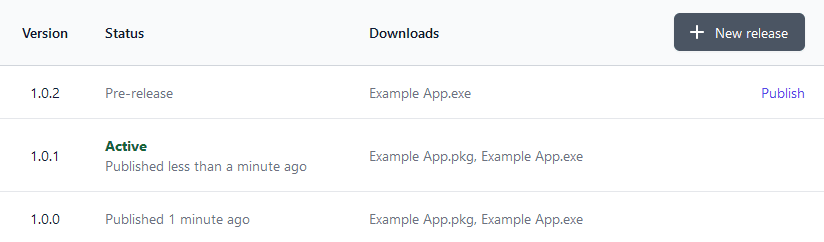
If you would rather do a automatic upload, but manual publication, set the publishImmediately query parameter to false, or remove it entirely. You can then publish it from the Moonbase app yourself:
A GitHub Action with curl
With the above, we can build the following action to automatically release software.
name: Moonbase Continuous Deployment

on:
  push:
    branches:
      - main

jobs:
  moonbase-cd:
    runs-on: ubuntu-latest

    steps:
      - name: Checkout
        uses: actions/checkout@v4

      - name: Build application
        run: make build # This depends on how you build your binaries

      - name: Prepare download
        run: |
          echo "DL_JSON=$(curl -X 'POST' \
            'https://demo.moonbase.sh/api/downloads/prepare?contentType=application%2foctet-stream' \
            -H 'Api-Key: ${{ secrets.MOONBASE_API_KEY }}')" \
            >> $GITHUB_ENV

      - name: Upload binary
        env:
          URL: ${{ fromJson(env.DL_JSON).url }}
        run: |
          curl --upload-file installer.exe $URL \
            -H 'Content-Type: application/octet-stream'

      - name: Create Moonbase release
        env:
          KEY: ${{ fromJson(env.DL_JSON).key }}
        run: |
          curl -X 'POST' 'https://demo.moonbase.sh/api/products/example-product/releases/new' \
            -H 'Api-Key: ${{ secrets.MOONBASE_API_KEY }}' \
            -H 'Content-Type: application/json' \
            -d '{
                "version": {
                    "major": 1,
                    "minor": 0,
                    "patch": 0
                },
                "downloads": [
                    {
                        "name": "installer.exe",
                        "platform": "Windows",
                        "key": "'$KEY'"
                    }
                ]
            }'
Be sure to plug in your favourite versioning tool to automatically increment the semantic version too!
Bonus: notifying users
Once you publish a new release in Moonbase, all customers will immediately have access to download the new version. But how will they know about it? One way is to use the licensing flow that you might already be using, as in the metadata of any license is the current release version of the product that the license has been issued for. If you opt for a flow where you periodically re-validate license activations, new metadata will contain updated product version numbers. Using this metadata, you can build UIs to notify your users about new versions being available. Learn more about the metadata available for license activations in our licensing API reference.